To use Db2 for i sources in database ingestion and replication tasks, first prepare the source database and review the usage considerations.
Source preparation
•For incremental load jobs and combined initial and incremental load jobs, grant the appropriate level of authority for accessing the Db2 journal and file objects that Database Ingestion and Replication uses to the user ID that runs database ingestion and replication jobs. The following table lists these objects and their Db2 authority requirements:
Object
Authority
Journal 1
*USE *OBJEXIST
Journal Library
*USE *EXECUTE
Journal Receiver
*USE for each requested journal receiver
Journal Receiver Library
*USE
File
*USE
File Library
*USE
•For incremental load jobs, journaling must be active on each database physical file that corresponds to a selected source table. Also, each journal must be configured with the IMAGES(*BOTH) option to store both before and after images of change data.
If journaling is not active on a physical file for a source table, when you define a database ingestion and replication task, you can generate a CDC script that activates it. The script issues the following command, which activates journaling and sets the IMAGES option to BOTH:
If journaling is already active for a physical file for a source table, the CDC script output contains the following comment:
Table 'table_name' is skipped because journaling is already enabled.
•By default, Database Ingestion and Replication uses the DataDirect JDBC for IBM Db2 driver to connect to the Db2 for i database. Informatica recommends that the first user who creates and tests a Db2 for i connection to the source database has DBA authority on the database. This authority is needed for the driver to create and upload the packages that it uses for Db2 access and to grant the EXECUTE privilege on the packages to PUBLIC. If a DBA user does not perform the first connection test, you must grant *USE authority on the CRTSQLPKG command for creating the packages and grant *CHANGE authority on the library in which the packages are created.
•To use SSL data encryption for Db2 for i sources, when you configure the Db2 for i connection properties, select JTOpen in the JDBC Driver field and select SSL in the Encryption Method field.
Also, add the required certificates to the Informatica Cloud Secure Agent JRE cacerts keystore in one of the following locations:
After you add the certificates, restart the Secure Agent to ensure the changes are reflected in the agent services app-truststore.jks files for the latest instances.
•Because Database Ingestion and Replication expects each source table row to be unique, Informatica recommends that each source table have a primary key. If no primary key is specified, Database Ingestion and Replication uses a unique index, if found. If no primary key or unique index is specified, Database Ingestion and Replication treats all columns as if they are part of the primary key.
•When you define a database ingestion and replication task, on the Source page, specify a journal name that is associated with the source tables that are enabled for journaling.
Important:
Ensure that the case and spelling of the name in the Journal Name field and table selection rules match the journal and table name values in the Db2 source catalog.
•Schema drift options are available for Db2 for i sources in database ingestion and replication incremental load and combined initial and incremental load jobs.
If you set the Add Column option to Replicate and then add a column with a default value to a Db2 for i source table, Database Ingestion and Replication adds the default value to the newly added table rows to the target. However, existing rows on the target are not updated to reflect the default values. To get the default value populated to the existing target rows, perform another initial load to re-materialize the target.
•Database Ingestion and Replication does not support the following Db2 for i data types:
- BLOB
- CLOB
- DATALINK
- DBCLOB
- GRAPHIC
- LONG VARGRAPHIC
- VARGRAPHIC
- XML
Database ingestion and replication jobs propagate nulls for columns that have these data types.
For information about the default mappings of supported source data types to target data types, see Default data-type mappings.
•If you use a Secure Agent group with multiple agents and the active agent goes down unexpectedly, database ingestion and replication jobs can automatically switch over to another available agent in the Secure Agent group. The automatic switchover occurs after the 15 minute heartbeat interval elapses. For database ingestion and replication jobs that have a Db2 for i source, automatic switchovers are subject to following limitations:
- Jobs cannot have persistent storage enabled.
- Jobs that have Kafka targets must store checkpoint information in the Kafka header. For any jobs that existed before the July 2025 release, automatic switchovers can't occur because checkpoint information is stored in the checkpoint file in the Secure Agent.
•To prevent the system from deleting Db2 journal receivers while database ingestion and replication incremental load and combined initial and incremental load jobs are reading changes from the receivers, Database Ingestion and Replication provides a journal receiver exit program. The exit program locks the journal receivers during CDC processing. To use the exit program, you must install it and set a few custom properties. For more information, see Database Ingestion and Replication journal receiver exit and Installing the Database Ingestion and Replication journal receiver exit.
Change capture mechanism for Db2 for i sources
Database Ingestion and Replication provides a single change capture mechanism and architecture for capturing change data from a Db2 source on IBM i and applying the data to a target.
The Secure Agent must run on a Linux or Windows box, separate from the IBM i source system. The network bandwidth between the IBM i system and the Secure Agent box must be robust. Informatica recommends network transfer rates that can handle100s of gigabits or one or more gigabytes of log data. If the network transfer rate is not capable of delivering the log data to the Secure Agent at speeds equal to or greater than the rate at which Db2 produces log data of CDC interest, the database ingestion job will not be able to provide the data to the target in a timely manner. If the data throughput does not meet your SLA, consider changing the hardware to increase the ethernet bandwidth between the IBM i system and the Secure Agent box.
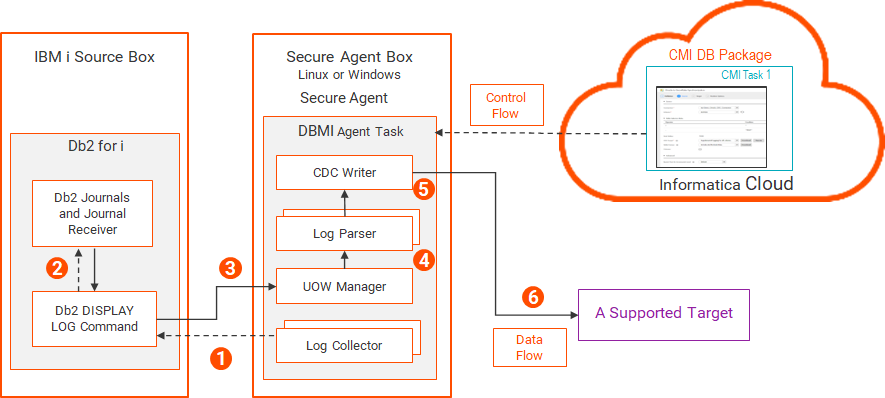
The following image shows the Db2 for i change capture components and data flow:
1The log collector, which runs in the DBMI Agent service under the Secure Agent, sends a request to the Db2 DISPLAY LOG command for Db2 for i journaled data.
Each request includes a starting RBA along with a list of tables of CDC interest for database ingestion.
2The command requests the data for the source tables from the Db2 journals and journal receiver.
3The command returns the journal entries containing the data to the UOW (Unit Of Work) Manager.
4The UOW Manager sends the journaled data in committed transaction order to the log parser.
5The log parser parses the DML changes from the committed transactions. Before sending the data to the CDC writer, the log parser transforms it into a canonical form of the Db2 journal data that can be consumed by the DBMI Agent task and applied to the target.
Note:
Because this resource-intensive activity occurs on the Secure Agent box, CPU consumption on the IBM i system is minimized.
6The CDC writer applies the formatted data to the target.
Database Ingestion and Replication journal receiver exit
Database Ingestion and Replication provides an exit program to prevent the deletion of Db2 for i journal receivers that are in use for change data capture processing. Use the journal receiver exit to prevent potential errors related to journal receiver deletion during CDC.
The exit program locks the journal receivers while they're being read by database ingestion and replication incremental load or combined load jobs. If the exit program finds a lock record for a journal receiver during CDC processing, the exit program returns a response that prevents the system from deleting the journal receiver.
When the database ingestion and replication job switches to the next journal receiver on the chain, Database Ingestion and Replication removes the lock record for the journal receiver that was last read and adds a lock record for the next journal receiver to be read. The system will not remove any journal receivers that are created subsequent to the currently locked receiver.
The control information for the journal receiver exit is stored in a Db2 for i table on the source system. The table contains the following columns:
•JOURNAL_RECEIVER_LIBARY. The name of the journal receiver library.
•JOURNAL RECEIVER_NAME. The name of a journal receiver.
•DBMI_MAPPING_NAME. A unique lock token name.
•LOCKED_BY_USER. The user ID of the connected user for which the lock was acquired.
•TIME_LOCKED. The time at which the lock was created.
Each combination of JOURNAL_RECEIVER_LIBRARY and JOURNAL_RECEIVER_NAME entries identifies a journal receiver instance that will be locked so that it can't be deleted during change data capture.
To use the journal receiver exit, perform the following steps:
When pwx.cdcreader.iseries.option.useJournalReceiverExit is set to true, you must specify a token string up to 256 characters in length that is unique for each database ingestion and replication job instance.
If the token string is not unique across all job instances, unpredictable results can occur, especially when multiple jobs are accessing the same journal receivers.
Also, ensure that the token value remains the same after a job Resume or Redeploy operation.
Set this property to true to enable Database Ingestion and Replication to check the maintenance level on the Db2 machine to determine if it's capable of doing journal receiver queries.
Deleting a journal lock when undeploying or stopping a job
You might want to delete a journal lock if you no longer want to run the job with the journal that is in the locked state. Or you might want to delete a journal lock if you must perform maintenance on a list of journal receivers, or other reasons.
To delete a journal lock, run SQL that uses the following format:
DELETE FROM INFORMATICA_DBMI_EXITS_VERSION_01.JOURNAL_RECEIVER_LOCK_INFORMATION WHERE DBMI_MAPPING_NAME="<unique_token_identifier_specified_by_pwx.cdcreader.iseries.option.JournalReceiverExitJobToken>"
Where unique_token_identifier_specified_by_pwx.cdcreader.iseries.option.JournalReceiverExitJobToken is the value used for the source definition custom parameter pwx.cdcreader.iseries.option.JournalReceiverExitJobToken.
Note:
Deleting a lock might cause journals to be deleted. If this situation occurs, you must re-materialize the DBMI job to proceed.
Installing the Database Ingestion and Replication journal receiver exit
Use the Data Ingestion and Replication journal receiver exit to prevent the deletion of Db2 for i journal receivers while they're in use for change data capture. To manually install journal receiver exit, complete the following steps:
1Unzip the V01_Exit_Install file to a local folder on your computer. For more information about the install file, see this knowledge article.
2Run the SQL statements in the SQL_1.txt file to check if the system has enough space for the installation. A return value of 1 means the system has enough space.
3Run the SQL statements in the SQL_2.txt file to create the schema and the default journal and journal receiver for journal receiver exit point handling.
4Run the FTP commands in the FTP_3.txt file to install the journal receiver exit.
Note:
Before starting FTP, navigate to the directory with the IBMi_SaveFile_V01.savf file, which contains journal receiver exit program.
5Run the SQL statements in the SQL_4.txt file to add the exit point to the IBM i system.
Note:
Before running the SQL, replace <userId> with a valid user ID for the system.
6Use the SQL statements in the SQL_5.txt file to create the Db2 objects used for locking journal receivers to prevent them from being deleted.