To use Db2 for z/OS sources in database ingestion and replication tasks, first prepare the source database and review the usage considerations.
Source preparation
•Database ingestion and replication incremental load jobs with a Db2 for z/OS source use a stored procedure to call the Db2 Instrumentation Facility Interface (IFI) to read change data from Db2 logs on the z/OS source system. Database Ingestion and Replication delivers the stored procedure libraries and JCL in the Db2 for zOS Database Ingestion connector package ZIP file. You must receive the stored procedure libraries into an APF-authorized library and then customize the JCL for your environment. The stored procedure runs in a Workload Manager (WLM) address space on the Db2 source system. For more information about z/OS system requirements, stored procedure setup, and required permissions, see Installing and configuring the stored procedure for Db2 for z/OS CDC.
•When you define a Db2 source in a database ingestion and replication incremental load task, you must select the option Enable CDC for all columns in the CDC Script field. Database Ingestion and Replication generates a script for enabling Db2 DATA CAPTURE CHANGES on the source tables and on certain Db2 catalog tables that are used for CDC. After this attribute is set for one job, all other jobs recognize that the attribute is enabled in Db2 for the catalog tables needed. You can either execute the CDC script from the user interface if you have sufficient privileges or ask a Db2 DBA who has SYSDBA authority to run the script.
•Make sure the Database Ingestion and Replication user has the Db2 for z/OS privileges that are required for the database ingestion and replication load type to be performed. For more information, see Db2 for z/OS privileges.
•Database Ingestion and Replication uses the Progress DataDirect JDBC IBM DB2 driver to connect to a Db2 for z/OS source. For a new implementation of Database Ingestion and Replication with Db2 for z/OS sources, the user who first runs an incremental job must have SYSADM or SYSDBA authority to establish JDBC connectivity.
•If you perform both initial loads and incremental loads and want to use different users with different Db2 for z/OS privileges for these job types, perform the following steps:
1Create separate Db2 for z/OS Database Ingestion connections for initial loads and incremental loads. In the connection properties, specify a user who has the Db2 privileges required for an initial load job or incremental load job that uses the connection.
2To restrict access to connections to certain users, you can set explicit user permissions on a connection asset in Administrator. To use the connection for running a job, the user must have the Execute permission. This practice prevents a user who has a lower level of privileges from running a job that requires a higher level of permissions.
3When you create a database ingestion and replication that uses the initial load or incremental load type, select the connection that specifies a user with the required Db2 privileges and asset permission.
Usage considerations
•Because Database Ingestion and Replication expects each source table row to be unique, Informatica recommends that each source table have a primary key. Database Ingestion and Replication does not honor unique indexes in place of a primary key. If no primary key is specified, Database Ingestion and Replication treats all columns as if they are part of the primary key.
•The default setting for z/OS is that schema drift is enabled when you run the ALTER statements for the catalog tables. After schema drift is enabled for one job, it is enabled for all jobs. If jobs are running when the ALTER statements are running, the running jobs do not have schema drift enabled until they are subsequently stopped and resumed.
•If you set the Add Column option to Replicate and an Add Column operation is captured, you should run the Db2 REORG TABLESPACE utility or Db2 LOAD utility with a RELOAD immediately after the ALTER TABLE <table> ADD COLUMN operation to make sure the Db2 page set's row data contains the new column values or null indicators.
•For CDC processing, Database Ingestion and Replication does not support Basic Row Format.(BRF) for Db2 for z/OS source table spaces. Use Reordered Row Format (RRF) instead. To get tables into RRF format, run the Db2 REORG utility or the UNLOAD utility with a subsequent reload.
•Database Ingestion and Replication does not support the following Db2 for z/OS data types:
- BLOB
- CLOB
- DBCLOB
- XML
Database ingestion and replication jobs propagate nulls for columns that have these data types.
•If you use a Secure Agent group with multiple agents and the active agent goes down unexpectedly, database ingestion and replication jobs can automatically switch over to another available agent in the Secure Agent group. The automatic switchover occurs after the 15 minute heartbeat interval elapses. For database ingestion and replication jobs that have a Db2 for z/OS source, automatic switchovers are subject to following limitations:
- Jobs cannot have persistent storage enabled.
- Jobs that have Kafka targets must store checkpoint information in the Kafka header. For any jobs that existed before the July 2025 release, automatic switchovers can't occur because checkpoint information is stored in the checkpoint file in the Secure Agent.
•If you store Db2 for z/OS archive logs in a Virtual Tape System (VTS), ensure that you first retain the archive log data sets on disk long enough for database ingestion and replication jobs to extract change data from them. When archive data sets are on shareable disk, multiple database ingestion and replication jobs can simultaneously process change data from the disk in parallel at high speed. When archive data sets are in a VTS and multiple jobs try to read the same archive, the archive data set is allocated, locked, and then unlocked for each job connection in Db2. This additional allocation and locking activity in an environment with a high volume of change data can cause allocation contention in Db2.
Installing and configuring the stored procedure for Db2 for z/OS CDC
To perform Db2 for z/OS CDC processing for incremental load jobs, Database Ingestion and Replication provides a stored procedure that runs on the z/OS source system. The stored procedure calls the Db2 Instrumentation Facility Interface (IFI) to collect change data from the Db2 logs.
z/OS system requirements
Before you begin, verify that the Db2 for z/OS source system meets the following requirements:
•The z/OS system has the recommended operating system version of 2.3 or later.
•The Db2 for z/OS source uses Db2 version 12 or 13.
•Ensure that a Workload Manager (WLM) address space exists for executing the Database Ingestion and Replication stored procedure.
If you have not set up a Db2 WLM address space, see the following IBM documentation for more information:
•Ensure that the library where the stored procedure for Db2 for z/OS CDC will be received exists and is APF-authorized on the z/OS system.
Install the Stored Procedure Libraries and Customize the JCL
On your client machine, perform the following steps:
1Verify that the Db2 for zOS Database Ingestion connector is available.
The Db2 for zOS Database Ingestion connector package contains the Db2 for z/OS stored procedure libraries. When the connector is enabled for the Secure Agent Group (runtime environment), the connector package .zip file is downloaded to the downloads folder in the installation location. The package name has the format package-DB2ZMI.nnnnn, where nnnnn is an incremented package version number. If multiple package versions exist, use the latest one.
2Unzip the package-DB2ZMI.nnnnn.zip file. The stored procedure files are added to the Db2WLMStoredProcedure folder under the package name.
3Use FTP to transfer the #STPINST file in the Db2WLMStoredProcedure folder to a sequential file, PDS, or PDSE on the z/OS system.
Notes:
- Transfer the file without binary mode set.
- Add a High Level Qualifier (HLQ) if needed to meet system requirements.
4Use FTP or another file transfer method to transfer each of the following files to a separate data set on the z/OS system:
- DBMI.ZOS.DBRMLIB.XMI
- DBMI.ZOS.LOADLIB.XMI
- DBMI.ZOS.USERJCL.XMI
Notes:
- Add or edit the HLQ if needed to meet system requirements.
- Transfer the files in binary mode.
- Ensure that each data set has the DCB attributes of LRECL=80, BLKSIZE=3120, and RECFM=FB.
You might need to pre-allocate a data set to specify the required attribute values.
On the z/OS system, use TSO to receive the transmit (XMI) data sets into an APF-authorized library and then edit the stored procedure JCL member. Also, set Db2 user privileges and add a row to the resource limit table if used.
1Receive the DBRMLIB transmit data set:
RECEIVE INDATASET(DBMI.ZOS.DBRMLIB.XMI)
Notes:
- If you specified a HLQ when transferring the data set to z/OS, include the HLQ.
- When you see the message INMR906A Enter restore parameters or 'DELETE' or 'END' +, enter your APF-authorized library:
DA(your.library_name) UNIT(unit) VOLUME(volume)
The UNIT() and VOLUME() operands are optional. Include them if your installation does not put RECEIVE files on a work unit or volume by default.
2Receive the LOADLIB transmit data set:
RECEIVE INDATASET(DBMI.ZOS.LOADLIB.XMI)
See the Notes in Step 1.
3Receive the USERJCL transmit data set:
RECEIVE INDATASET(DBMI.ZOS.USERJCL.XMI)
See the Notes in Step 1.
4Customize the #STPINST file that contains the stored procedure JCL for your environment.
The JCL creates the stored procedure and a global temporary table that holds the results of the requests to the Db2 IFI for data. It also binds the stored procedure package.
Notes:
- Based on the comments at the top of the JCL file, replace variables in the JCL with the values appropriate for your z/OS environment, including the Db2 subsystem name (!DSN!), stored procedure schema name (!SCHEMA!), stored procedure name (!STRPRC!), WLM environment name (!WLMENV!), and the name of the DBRMLIB transmit data set (!DBRMLIB! received in Step 1.
- If you used a HLQ for the received data sets, include the HLQ in the JCL.
- The WLM environment name is specified in the procedure APPLENV parameter or in the EXEC PARM of the WLM address space.
- You can use the received LOADLIB library after it is APF-authorized, or copy the contents of the library to your own APF-authorized library.
- The STEPLIB concatenation in the WLM address space must contain only APF-authorized libraries for the Db2 IFI to run.
5Customize the JCL in members of the received USERJCL data set. For more information, see Db2 for z/OS USERJCL Data Set.
6Ensure that the required Db2 privileges have been granted before you run the stored procedure JCL job. For more information, see Db2 for z/OS privileges.
7Add a row in the Db2 DSNRLSTxx resource limit table for database ingestion packages to ensure processor resources are adequate for stored procedure processing. Otherwise, incremental load jobs might abend. Add the row with the following columns:
- An AUTHID column with the authentication ID that the database ingestion and replication task uses OR an RLFPDG column with the same package name as the database ingestion and replication task OR both of these columns.
- An ASUTIME column defined with NULL or with a resource limit that is greater than the default limit.
Then issue the Db2 -START RLIMIT command for For the changes to the resource limit table to take effect.
Db2 for z/OS USERJCL Data Set
The downloaded USERJCL data set is a partitioned data set (PDS) or extended partitioned data set (PDSE) that contains a JCL member for running a job that collects information that is not readily available otherwise when using Informatica-supplied WLM Db2 stored procedure.
You can fully customize member JCL in the USERJCL PDS or PDSE. Informatica recommends that you create a copy of a delivered JCL member under another name and then customize the copy so that original member is retained intact for reference.
If you install multiple stored procedures on multiple Db2 subsystems, you can install only one USERJCL library and create members in it that are tailored for each Db2 subsystem. Alternatively, you can create a separate library for a specific Db2 subsystem. Make sure that the database ingestion and replication job contains the correct library and member information for the Db2 subsystem.
The USERJCL PDS or PDSE contains the following member:
LOGINV member
LOGINV contains JCL for a job that obtains a Db2 log inventory list. If you set the Initial Start Point for Incremental Load property to Specific Date and Time for an ingestion task in the task wizard, the inventory list is used to determine the start point in the logs when the database ingestion and replication job runs for the first time or restarts. The log inventory list provides Database Ingestion and Replication with a starting RBA or LSN and an ending RBA or LRSN, along with the starting and ending timestamps of all active and archive logs for the Db2 subsystem. Database Ingestion and Replication uses this information to select the appropriate log archive to search for the requested start point. If the Initial Start Point for Incremental Load property is set to any option other than Specific Date and Time, you do not need to install the USERJCL library.
Contents of the LOGINV member:
//<USERID>I JOB 'LOG INVENTORY',MSGLEVEL=(1,1),MSGCLASS=X, // NOTIFY=&SYSUID,CLASS=A,REGION=0M //* ------------------------------------------------------- //* //* PLEASE CHANGE DSN? TO THE DB2 SUBSYSTEM OF YOUR CHOICE. //* //* THIS JCL MEMBER CAN BE USED TO RUN A LOG INVENTORY //* LIST. DBMI WILL REQUEST THIS IF A DBMI JOB IS TRYING TO //* RETART USING TIME. THE LOG INVERNTORY GIVES DBMI THE //* ABILITY TO CORRELATE RBA/LSRN TO ACTUAL LOG RESTART //* POSITIONS. DBMI PARSES THE SYSPRINT OUTPUT TO GET THE //* REQUIRED INFORMATION. //* //* //* SUBSTITUTION TAGS //* _________________ //* //* SUBSTITUTION TAGS ARE USED TO INSERT DATA INTO THE JOB //* BY DBMI BEFORE IT IS SUBMITTED. YOU MAY COPY THIS JCL //* INTO ANOTHER MEMBER AND MODIFY ITS CONTENTS. SUBSTITUTION //* TAGS MAY ALSO BE REMOVED AND HARD CODED FOR INDIVIDUAL //* JOB NEEDS. //* //* //* <USERID> WILL BE REPLACED WITH THE USER ID. //* //* ------------------------------------------------------- //LOGINV EXEC PGM=DSNJU004 //STEPLIB DD DISP=SHR,DSN=DSN?10.SDSNLOAD // DD DISP=SHR,DSN=DSN?10.DSNC.RUNLIB.LOAD //SYSUT1 DD DISP=SHR,DSN=DSN?.BSDS01 //SYSPRINT DD SYSOUT=* //SYSSUMRY DD SYSOUT=* //
Note:
In this JCL, Database Ingestion and Replication replaces <USERID> with the user specified in the Db2 for z/OS Database Ingestion connection properties
To submit USERJCL member jobs and retrieve output from submitted jobs, Database Ingestion and Replication executes Db2-supplied stored procedures in batch as required. Make sure that the Database Ingestion and Replication user has the required privileges to execute these stored procedures. For more information about Db2-supplied procedures, see https://www.ibm.com/docs/en/db2-for-zos/12?topic=sql-procedures-that-are-supplied-db2.
A USERJCL member is processed in the following manner:
1For the LOGINV member, if the Initial Start Point for Incremental Load advanced property is set to Specific Date and Time on the Source page of the database ingestion and replication task wizard, Database Ingestion and Replication checks whether the following custom properties are specified for the source:
- pwx.cdcreader.ZOS.Db2JobsDSN, which specifies the name of the installed USERJCL PDS or PDSEd
- pwx.cdcreader.ZOS.Db2JobLLOGINVMember, which specifies the LOGINV member name that will be used for a database ingestion and replication job.
2Database Ingestion and Replication reads the LOGINV member by using the Db2-supplied stored procedure ADMIN_DS_BROWSE.
3Database Ingestion and Replication substitutes any tags required for the job execution.
4Database Ingestion and Replication submits the job to the Db2 for z/OS database by using the Db2-supplied stored procedure ADMIN_SUBMIT_JOB.
5Database Ingestion and Replication queries the status of the submitted jobs by using the Db2-supplied stored procedure ADMIN_JOB_QUERY.
6After the job completes, Database Ingestion and Replication obtains the job output by using the Db2-supplied stored procedure ADMIN_JOB_FETCH.
Db2 for z/OS privileges
To deploy and run a database ingestion and replication task that has a Db2 for z/OS source, the source connection must specify a Database Ingestion and Replication user who has the privileges required for the ingestion load type.
Privileges for initial load processing
•For initial load jobs, grant the following privilege to the user specified in the Db2 for zOS Database Ingestion connection properties:
SELECT on schema.table TO user
Where schema.table identifies a source table.
•To run queries against Db2 catalog tables during source unload processing, grant the SELECT privilege on the following catalog tables:
- SYSIBM.SYSCOLUMNS
- SYSIBM.SYSINDEXES
- SYSIBM.SYSKEYS
- SYSIBM.SYSTABLEPART
- SYSIBM.SYSTABLES
- SYSIBM.SYSTABLESPACE
Privileges for incremental load processing
For incremental load jobs, grant the following privileges.
Note:
If you do not have the authority required to issue these grants, ask a Db2 administrator who has SYSDBA authority or a higher authority level to issue them.
•To enable the user to obtain required information from the Db2 Instrumentation Facility Interface (IFI):
GRANT MONITOR2 TO user; COMMIT;
•To grant authorities on the global temporary table to the user:
GRANT INSERT ON !SCHEMA!.!STRPRC!_RS_TBL to user; GRANT DELETE ON !SCHEMA!.!STRPRC!_RS_TBL to user; GRANT EXECUTE ON PROCEDURE !SCHEMA!.!STRPRC! to user; COMMIT;
Where !SCHEMA! and !STRPRC! are variables in the job JCL, which represent the stored procedure schema name and procedure name respectively.
The first two privileges allow the user to read and delete the contents of the Global Temporary Table to which the stored procedure is writing the log data. The third privilege allows the user to run the stored procedure.
Note:
If the GRANT INSERT ON or GRANT DELETE ON statement fails with SQLCode -526, use the following GRANT instead:
GRANT ALL PRIVILEGES ON !SCHEMA!.!STRPRC!_RS_TBL to user;
•To enable the stored procedure to bind its Db2 plan, grant the following privileges to PUBLIC:
GRANT BIND, EXECUTE ON PLAN !STRPRC! TO PUBLIC; COMMIT;
•To run queries against Db2 catalog tables during source unload processing, grant the SELECT privilege on the following catalog tables:
- SYSIBM.SYSCOLUMNS
- SYSIBM.SYSDUMMY1
- SYSIBM.SYSINDEXES
- SYSIBM.SYSKEYS
- SYSIBM.SYSTABLEPART
- SYSIBM.SYSTABLES
- SYSIBM.SYSTABLESPACE
Note:
To make the change data for tables in the Db2 logs available to the stored procedure, issue the following SQL for each source table:
ALTER TABLE schema.table DATA CAPTURE CHANGES <--for each source table COMMIT;
To issue this statement, you'll need ALTER authority. If you don't have it, ask the Db2 DBA to issue this SQL or to grant ALTER authority to you. For more more information, see Enabling Db2 DATA CAPTURE CHANGES.
Permissions Required for Executing the Stored Procedure on z/OS
Ensure that the following Db2 permissions are granted before you run the stored procedure JCL job:
•Ensure that the user who executes the stored procedure job has SYSADM authority, or ask the Db2 for z/OS DBA to run it.
•For the stored procedure to run, you must grant the following Db2 permissions to the procedure schema name specified in the #STPINST JCL file:
- SELECT authority on Db2 catalog tables:
GRANT SELECT ON SYSIBM.* TO schema;
- EXECUTE authority on the package name specified in the JCL.
GRANT EXECUTE ON PACKAGE package_name TO user;
Additionally, grant INSERT and DELETE authority on the schema and stored procedure name that are specified in the JCL for the global temporary table:
GRANT INSERT, DELETE ON schema.stored_procedure_name_RS_TBL TO user
Enabling Db2 DATA CAPTURE CHANGES
You must enable Db2 DATA CAPTURE CHANGES on some system catalog tables and the Db2 source tables to log SQL change events in an expanded format that is required for change data replication.
•Set DATA CAPTURE CHANGES on the following system catalog tables:
- SYSIBM.SYSCOLUMNS
- SYSIBM.SYSINDEXES
- SYSIBM.SYSKEYS
- SYSIBM.SYSTABLES
- SYSIBM.SYSTABLESPACE
From an interactive z/OS interface of your choice, submit the following SQL statement for each catalog table:
ALTER TABLE SYSIBM.<systable_name> DATA CAPTURE CHANGES
You must have ALTER authority to issue this statement. Usually, the Db2 DBA has this authority and issues the statement. If you need to set DATA CAPTURE CHANGES and don't have ALTER authority, ask your Db2 DBA to grant ALTER authority to you for each catalog table using the following statement:
GRANT ALTER ON TABLE SYSIBM.<systable_name> TO <user>;
After the ALTER TABLE SQL is run once, all database ingestion and replication jobs have access to the system catalog tables for CDC processing in the Db2 log stream.
However, for jobs to read the catalog tables to detect schema drift changes, users who have a lower authority level will need to be granted SELECT authority for read access to each catalog table:
GRANT SELECT ON TABLE SYSIBM.<systable_name> TO <user>;
•To generate a CDC script that enables the DATA CAPTURE CHANGES option for the selected source tables from the user interface, issue the following SQL statement for each table:
ALTER TABLE schema.table DATA CAPTURE CHANGES <--for each source table COMMIT;
If you don't generate the CDC script, issue this same SQL statement for each source table. This SQL statement also makes the change data for tables in the Db2 logs available to the stored procedure.
Change capture mechanism for Db2 for z/OS sources
Database Ingestion and Replication provides a single change capture mechanism and architecture for capturing change data from a Db2 source on z/OS and applying the data to a target. This architecture uses multithreaded processing to optimize the performance of collecting data and of parsing and transforming the data into a format the target accepts.
The Secure Agent must run on a Linux or Windows box, separate from the Db2 z/OS source system. The network bandwidth between the z/OS system and the Secure Agent box must be robust. Informatica recommends network transfer rates that can handle100s of gigabytes or one or more gigabits of log data. If the network transfer rate is not capable of delivering the log data to the Secure Agent at speeds equal to or greater than the rate at which Db2 produces log data of CDC interest, the database ingestion and replication job will not be able to provide the data to the target in a timely manner. If the data throughput does not meet your SLA, consider changing the hardware to increase the ethernet bandwidth between the z/OS system and the Secure Agent box.
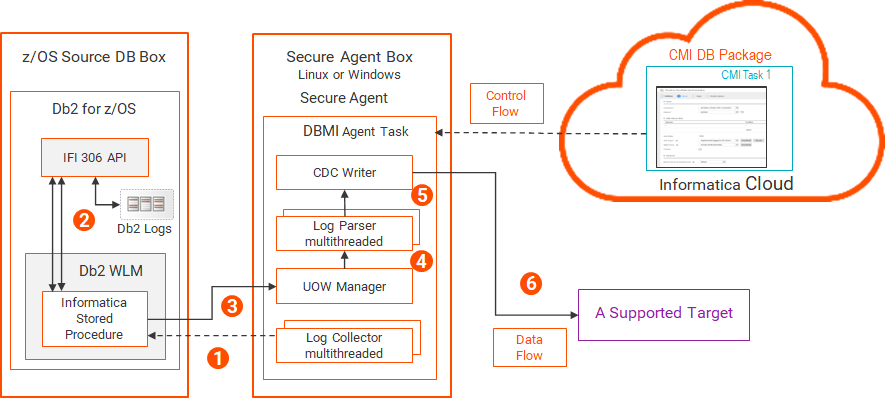
The following image shows the Db2 for z/OS change capture components and data flow:
1The multithreaded log collector, which runs in the DBMI Agent service under the Secure Agent, issues multiple concurrent requests for Db2 log data to the Db2 stored procedure.
Each request includes a starting RBA, or a starting LRSN if the logs are in a data-sharing environment, along with a list of tables of CDC interest for database ingestion.
While processing a sequence of log data, the log collector can request the next sequence of log data.
2The Db2 Instrumentation Facility Interface ( IFI) API extracts data for the selected source tables of CDC interest from active and archive logs. The IFI then transfers the data, in raw, native form, to the Informatica Db2 stored procedure in z/OS Workload Manager (WLM).
3The Db2 stored procedure returns the UOWs with captured data to the UOW Manager.
4The UOW Manager sends the UOWs in commit order to the log parser.
5The multithreaded log parser concurrently parses DML changes from the committed UOWs. The result is raw native Db2 log data in the format that the target type expects.
Note:
Because this resource-intensive activity occurs on the Secure Agent box, CPU consumption on the z/OS system is minimized.
6The CDC writer applies the formatted data to the target.