To use Oracle sources in database ingestion and replication tasks, first prepare the source database and review the usage considerations.
Source preparation
•Define the location of the Oracle client installation directory in one of the following ways:
- For the Database Ingestion agent service, set the ociPath property in Administrator to point to the OCI library that contains the oci.dll or libcIntsh.so file. The OCI library is used by database ingestion and replication CDC tasks to connect to Oracle. When the agent runs, this path is appended to the PATH environment variable value on Windows or the LD_LIBRARY_PATH value on Linux.
- Manually add the Oracle client installation directory in the PATH or LD_LIBRARY_PATH environment variable.
You'll need to specify the full Oracle client installation path unless you define the ORACLE_HOME environment variable to point to the installation directory that's one level up from the bin directory on Windows or the lib directory on Linux. Then you can use %ORACLE_HOME%\bin or $ORACLE_HOME/lib in the client installation path.
•Ensure that the location of the tnsnames.ora file is specified if you set the Database Connect String property to a TNS name in the Oracle Database Ingestion connection properties. The tnsnames.ora file, along with the Oracle Call Interface (OCI), is used to communicate with the Oracle source database. Data Ingestion and Replication looks for the tnsnames.ora file in the following locations, in order of priority:
- TNS_ADMIN environment variable. You can use this environment variable to point to the directory location of the tsnnames.ora file if the file is not in the $ORACLE_HOME/network/admin directory or default <Oracle client library path>/../network/admin directory.
- $ORACLE_HOME/network/admin .
- <Oracle_client_library_path>/../network/admin
•Make sure that the Database Ingestion and Replication user has the Oracle privileges that are required for the database ingestion and replication load type to be performed.
•Database ingestion and replication jobs that use log-based CDC require read access to Oracle online and archive redo logs to read incremental change data. If the redo logs are remote from the on-premises system where the Secure Agent runs, make sure that read access to the logs is provided, for example, by using Oracle Automatic Storage Management (ASM), mounting the logs to a network file system (NFS), or configuring BFILE access to logs that are on the Oracle file system.
•If you plan to read data from redo log files in Oracle ASM, Informatica recommends that you set the sqlnet.recv_timeout parameter in the local sqlnet.ora file to less than 5 minutes. This parameter specifies the duration of time that the Oracle client waits for a response from ASM before a query times out. Network interrupts and other factors can occasionally make Oracle connections unresponsive. Setting this value ensures that the reader can respond and recover from any such situation in a timely manner.
•Ensure that the Oracle Database Client or Instant Client is installed and configured on the Secure Agent server for the Secure Agent to communicate with Oracle. If you do not already have an Oracle client installed, you can download a client and access installation information from the Oracle web site, or ask your Oracle DBA to download and configure an Oracle client.
•For incremental load or combined initial and incremental load operations that use log-based CDC, perform the following prerequisite tasks in Oracle:
- Enable ARCHIVELOG mode for the Oracle database. If the database is not in an Amazon RDS environment, issue the following SQL statements:
SHUTDOWN IMMEDIATE; STARTUP MOUNT; ALTER DATABASE ARCHIVELOG; ALTER DATABASE OPEN; SHUTDOWN IMMEDIATE; STARTUP;
For an Amazon RDS for Oracle databases, set the backup retention period to place the database in ARCHIVELOG mode and enable automated backups.
- Define an archive log destination.
- Enable Oracle minimal global supplemental logging on the source database.
- If your Oracle source tables have primary keys, ensure that supplemental logging is enabled for all primary key columns. For source tables that do not have primary keys, ensure that supplemental logging is enabled for all columns from which change data will be captured.
Note:
When you create a database ingestion and replication task, you have the option of generating a script that implements supplemental logging for all columns or only primary key columns for the selected source tables.
- Ensure that the Oracle MAX_STRING_SIZE initialization parameter is not set to EXTENDED. If it is set to EXTENDED, Database Ingestion and Replication will not be able to replicate inserts and updates for tables containing columns defined with large (extended size) VARCHAR2, NVARCHAR2, or RAW columns.
If you do not have the authority to perform these tasks, ask your Oracle database administrator to perform them. For more information, see the Oracle documentation.
•For incremental load operations that use query-based CDC, the source table must contain the CDC query column that is used to indicate the changed rows. You must add the query column to the source tables before creating the database ingestion and replication task. The supported Oracle data type for the query column is TIMESTAMP.
If the source tables selected for the query-based CDC do not have the CDC query column, change data capture will ignore these tables and will continue with the rest of the tables. For the tables that are skipped, corresponding tables generated in the target database will be empty. If none of the source tables have a CDC query column, the deployment of the job will fail.
Amazon Relational Database Service (RDS) for Oracle source preparation:
1Create the ONLINELOG_DIR and ARCHIVELOG_DIR directories that will hold the online and archive redo logs, respectively, on the RDS file system. Use the following exec statements:
4In the Amazon RDS console, set the backup retention period for the source database to a value greater than zero to enable automated backups of the database instance.
Note:
This step enables ARCHIVELOG mode for the database.
5Ensure that supplemental logging is enabled at the database level. Use the following statement:
When you create a database ingestion and replication task, you can generate a script to enable supplemental logging for the selected source tables.
6Optionally, in the Amazon RDS console, you can create a parameter group and define the cache sizes of the default buffer pool. The default buffer pool holds buffers that use the primary database block size. Use the following DB_CACHE_SIZE parameter values:
- DB_2K_CACHE_SIZE
- DB_4K_CACHE_SIZE
- DB_16K_CACHE_SIZE
- DB_32K_CACHE_SIZE
Then select the parameter group for the source database.
Usage considerations
•For incremental load operations with Oracle sources, Database Ingestion and Replication provides alternative capture methods for capturing change data from the source and applying the data to a target. The available change capture methods are:
- Log-based change data capture. Database Ingestion and Replication reads data changes from Oracle redo logs. This method requires users to have extended privileges.
- Query-based change data capture. Change data capture uses a SQL statement with a WHERE clause that references a common CDC query column to identify the rows with insert and update changes. Configuration of the source database is limited to adding the CDC query column to each source table. Users must have at least read only access to the source tables.
•Because Database Ingestion and Replication expects each source table row to be unique, Informatica recommends that each source table have a primary key. Database Ingestion and Replication does not honor unique indexes in place of a primary key. If no primary key is specified, Database Ingestion and Replication treats all columns as if they are part of the primary key. Exception: For Oracle query-based CDC, a primary key is required in each source table.
•For Oracle sources that use the multitenant architecture, the source tables must reside in a single pluggable database (PDB) within a multitenant container database (CDB).
•You can use Oracle Transparent Data Encryption (TDE) to encrypt data in tablespaces that contain Oracle source tables for incremental load processing. Database Ingestion and Replication supports storing the master encryption key in a TDE keystore that is in a file system, in ASM, or in an external hardware security module (HSM) that supply PKCS11 interfaces, such as Oracle Key Vault (OKV). For more information, contact Informatica Global Customer Support.
•If you use an Oracle source database in an Oracle Cloud Infrastructure (OCI) environment, you can use Database Ingestion and Replication to perform Log-based CDC, provided the following requirements are met:
- Access to the Oracle database logs is configured either through ASM connection properties in the Oracle Database Ingestion connection or BFILE access to the file system.
- Access to the Oracle database wallet is configured to allow the TDE master key to be retrieved.
Note:
You can’t use an Oracle Autonomous Database (ADB) system with an OCI database source.
•Database Ingestion and Replication can process data across a RESETLOGS boundary. To avoid the source and targets becoming out of sync, Informatica recommends that you stop capture processing before performing a RESETLOGS and then restart capture processing after the RESETLOGS event. Otherwise, the capture process might send data to the target that is subsequently reverted by the RESETLOGS event, causing the source and target to become out of sync.
•Alternative strategies for accessing the Oracle redo logs are available. For more information, see Oracle log access methods for CDC.
•If a database ingestion and replication incremental load or combined initial and incremental load task contains an Oracle source table name or one or more column names that are longer than 30 characters, Oracle suppresses supplemental logging for the entire table, including primary keys and foreign keys. As a result, most operations on the table fail. This problem is caused by an Oracle restriction. In this situation, exclude the table from capture processing or rename the long table and column names to names of 30 characters or less.
•If Oracle source CHAR or VARCHAR columns contain nulls, the database ingestion and replication job does not delimit the null values with double-quotation (") marks or any other delimiter when writing data to a Amazon S3, Flat File, Microsoft Azure Data Lake, or Microsoft Azure Synapse Analytics target.
•Database Ingestion and Replication can replicate data from Oracle BLOB, CLOB, NCLOB, LONG, LONG RAW, and XML columns to Amazon Redshift, Amazon S3, Databricks, Google Big Query, Google Cloud Storage, Microsoft Azure Data Lake Storage Gen2, Microsoft Azure Synapse Analytics, Microsoft Fabric OneLake, Oracle, Oracle Cloud Object Storage, PostgreSQL, Snowflake, and SQL Server targets. You must select Include LOBs under Advanced on the Source page when you configure the task. LOB column data might truncated on the target if it is greater in size than the byte limit allowed by target type.
Database Ingestion and Replication does not support change data capture from compressed Oracle LOB data types.
•Database ingestion and replication jobs that have an Oracle source and use the log-based CDC method may not have access to before and after image values of LOB type columns in source Update and Delete commands. This may impact jobs with Data Lake or Kafka targets or relational database targets with audit mode enabled where LOB column values might be seen as null in the target’s reported update and delete activity.
•Database ingestion and replication combined load jobs that have an Oracle source with XML columns stored in binary or CLOB format process the source data as CLOBs and create the target table with corresponding CLOB, VARCHAR, or string columns, depending on the target type.
•Database Ingestion and Replication does not support the following Oracle source data types with any target type or load type:
- "ANY" types such as ANYTYPE, ANYDATA, ANYDATASET
- Extended types
- INTERVAL
- JSON
- BFILE type for storing LOB data externally
- UROWID
- Spatial types such as SDO_GEOMETRY
- User-defined types such as OBJECT, REF, VARRAY, nested table types
Source columns that have unsupported data types are excluded from the target definition.
For information about the default mappings of supported Oracle data types to target data types, see Default data-type mappings.
•To use the Oracle TIMESTAMP WITH TIME ZONE or TIMESTAMP WITH LOCAL TIME ZONE data type, set the DBMI_ORACLE_SOURCE_ENABLE_TIMESTAMP_WITH_TZ or DBMI_ORACLE_SOURCE_ENABLE_TIMESTAMP_WITH_LOCAL_TZ environment variable, respectively, to true for the Database Ingestion agent service. In Administrator, open your Secure Agent and click Edit . Under Custom Configuration Details, add the environment variable with the following details:
- Service: Database Ingestion
- Type: DBMI_AGENT_ENV
- Name: DBMI_ORACLE_SOURCE_ENABLE_TIMESTAMP_WITH_TZ or DBMI_ORACLE_SOURCE_ENABLE_TIMESTAMP_WITH_LOCAL_TZ
- Value: true
•Do not use custom data-type mapping rules to map an Oracle source RAW column to a target CHAR or VARCHAR column. Otherwise, the deployment of the database ingestion and replication task might fail.
•Database Ingestion and Replication does not support invisible columns in Oracle source columns, regardless of the target type. For these columns, database ingestion and replication incremental load jobs and combined initial and incremental load jobs propagate nulls to the corresponding target columns.
•If you update the primary key value in the Oracle source table for a record that does not exist in the target table, the record is not replicated to the target. However, the monitoring interface increments the Update count to include the primary key update. The data will replicate to the target if the record already exists in the target table before the update of the primary key value.
•If an Update to an Oracle table does not change an existing column value, the Update count in the monitoring details for the table is still incremented but no Update row is applied to the target. Database Ingestion and Replication ignores Update rows that do not actually change values. Also, for most database targets, Database Ingestion and Replication does some aggregation of change records at a micro-batch level before writing changes to the targets. This situation can also lead to a mismatch between the Update count in the monitoring statistics and the rows applied to the target.
•The supplemental logging settings for tables might be ignored by Oracle if the table name or any table column name is longer than 30 characters. In this case, the results of database ingestion and replication incremental load or combined load jobs are unpredictable.
•Database Ingestion and Replication does not support derived columns in jobs that have an Oracle source.
•For Oracle combined initial and incremental load jobs, Oracle Flashback queries are used to get committed data that was current at a specific point in the change stream. Ensure that no source table is truncated during the initial load period. If truncation occurs, any DDL change performed during a flashback query causes the query to fail.
•If you use a Secure Agent group with multiple agents and the active agent goes down unexpectedly, database ingestion and replication jobs can automatically switch over to another available agent in the Secure Agent group. The automatic switchover occurs after the 15 minute heartbeat interval elapses. For database ingestion and replication jobs that have an Oracle source, automatic switchovers are subject to following limitations:
- Jobs cannot have persistent storage enabled.
- Jobs that have Kafka targets must store checkpoint information in the Kafka header. For any jobs that existed before the July 2025 release, automatic switchovers can't occur because checkpoint information is stored in the checkpoint file in the Secure Agent.
- Jobs that use the Query-based CDC method must have an Amazon Redshift, Databricks, Google BigQuery, Microsoft Azure Synapse Analytics, Oracle, PostgreSQL, Snowflake, or SQL Server target.
•For incremental load and combined initial and incremental load jobs that use the query-based CDC method, the following limitations apply:
- A primary key is required in each selected source table. If a primary key is not present in a source table, change data capture ignores the table and continues processing with the rest of the selected source tables. If none of the source tables have a primary key, the job will fail.
- Query-based CDC does not capture Delete operations.
- All Insert and Update operations are treated as Upserts and displayed in the monitoring interface and logs as Updates.
- If a Daylight Savings Time change or a time zone change is detected at the start of a particular cycle or when the job resumes from a failed or stopped state, Database Ingestion and Replication will resume and process the changes that occurred in that cycle. You must restart the Oracle database to apply a Daylight Savings Time change or a time zone change.
•After a database ingestion and replication job with an Oracle source has run, if you select additional source columns for replication and redeploy the task, the job does not immediately re-create the target table with the additional columns or replicate data for them. However, an incremental load or combined initial and incremental load job will add the newly selected columns to the target and replicate data to them when it processes the next new DML change record, provided that you set the schema drift Add Column option to Replicate. An initial load job will add the newly selected columns to the target and replicate data to them the next time the job runs.
•Database Ingestion and Replication can capture change data from Oracle Exadata machines but does not support Oracle Exadata Hybrid Columnar Compression (EHCC).
•Database Ingestion and Replication jobs of any load type cannot use Oracle synonyms as sources.
•If LOB data is incompletely logged for an Oracle source for any reason, database ingestion and replication jobs that process the source and have the Include LOBs option enabled will issue a warning message such as:
PWX-36678 ORAD WARN: Failed to fetch LOB data for table <schema>.<table> column <column> to resolve partially logged data.
Usually, data is incompletely logged because it was appended to an existing LOB column. This issue can occur for any load type.
To resolve the issue, specify the pwx.cdcreader.oracle.option.additional custom property with the LOB_FETCHBACK=Y parameter on the Source page of the task wizard. This setting causes the current data to be fetched directly from the database, instead of from the logs. To successfully use this solution, the user must be granted the SELECT ON ANY TABLE privilege.
•Database Ingestion and Replication BFILE access to Oracle data using directory objects can support multiple log locations, such as those in environments with primary and standby databases, RDS database instances, or a Fast Recovery Area to which the USE_DB_RECOVERY_FILE_DEST parameter points. Database Ingestion and Replication can automatically find the logs by querying for all directory objects that begin with ARCHIVELOG_DIR and ONLINELOG_DIR and end with any suffix, for example, ARCHIVELOG_DIR_01, ARCHIVE_LOG_DIR_02, and so on. You can override the ARCHIVELOG_DIR and ONLINELOG_DIR names by using the custom properties pwx.cdcreader.oracle.database.additional BFILEARCHIVEDIR=<directory_object> and pwx.cdcreader.oracle.database.additional BFILEONLINEDIR=<directory_object>.
If you grant the CREATE ANY DIRECTORY and DROP ANY DIRECTORY privileges to database users who run database ingestion and replication jobs, the directory objects can be created at runtime, as needed. For example, if multiple archive and online log destinations exist in a database, the directory objects could be created with the following naming convention:
- <ARCHIVEDIRNAME>_01
- <ARCHIVEDIRNAME>_02
- <ONLINEDIRNAME>_01
- <ONLINEDIRNAME>_02
Database Ingestion and Replication performs no cleanup processing on these generated directory objects.
If you use the USE_DB_RECOVERY_FILE_DEST parameter and the CREATE ANY DIRECTORY and DROP ANY DIRECTORY privileges have not been granted, your DBA must create the directory objects daily or weekly, before your database ingestion and replication jobs run, by using a script such as:
create or replace directory ARCHIVELOG_DIR_2024_08_19 as '<DB_RECOVERY_FILE_DEST>/2024_08_19'
If you use the USE_DB_RECOVERY_FILE_DEST parameter and the database user has the CREATE ANY DIRECTORY and DROP ANY DIRECTORY privileges, the directory objects are created as needed at runtime and dropped after 14 days. These directory objects have the naming convention <ARCHIVEDIRNAME>_YYYY_MM_DD.
•Database ingestion and replication incremental load or combined load jobs that have an Oracle source and a file-based target, such as Azure Data Lake Storage Gen2, Amazon S3, Microsoft Fabric OneLake, or Google Cloud Storage, replicate only updated column values and primary key column values to the target if you set the CDC Script field to Enable CDC for primary key columns in the source properties. For other columns, the jobs replicate nulls to the target because supplemental logging of data to redo logs is not enabled for those columns.
If you need all column values for updates replicated to your file-based target, set the CDC Script field to Enable CDC for all columns.
Gathering Information About the Database Ingestion and Replication environment
Before you start creating database ingestion and replication tasks, gather the following information:
What type of load operation do you plan to perform: an initial load (point-in-time bulk load), incremental load (only the changes), or combined initial and incremental load (initial load followed by incremental load)?
Do you need to capture change data from tablespaces that use Oracle Transparent Data Encryption (TDE)? If yes, what are the TDE wallet directory and password?
Are the redo logs in an Oracle Automatic Storage Management (ASM) environment? If you plan to connect to an ASM instance to read redo logs, are you allowed to create a login user ID for ASM that has SYSDBA or SYSASM authority?
If you do not have the authority to read the redo logs directly, can the archived redo log files be copied to shared disk or to a file system from which you can access them?
Can you make your archived redo logs available for diagnostic use by Informatica Global Customer Support, if necessary, to diagnose an error or anomaly during CDC processing?
Do the source tables contain columns that have unsupported data types? To determine which data types are not supported for your source types, see the source-specific topics under "Database Ingestion and Replication source considerations" in the Database Ingestion and Replication help.
Are you allowed to create a new Oracle user and assign the privileges that Database Ingestion and Replication requires to that user? Determine the user name to use.
To deploy and run a database ingestion and replication task that has an Oracle source, the source connection must specify a Database Ingestion and Replication user who has the privileges required for the ingestion load type.
Privileges for incremental load processing with log-based CDC
Note:
If the Oracle logs are managed by ASM, Informatica recommends that the user has the SYSDBA privilege, which is the minimum system privilege that allows read only access to the ASM file system.
For a database ingestion and replication task that performs an incremental load or combined initial and incremental load using the log-based CDC method, ensure that the Database Ingestion and Replication user (cmid_user) has been granted the following privileges:
GRANT CREATE SESSION TO <cmid_user>;
GRANT SELECT ON table TO <cmid_user>; -- For each source table created by user
-- Include the following grant only if you want to Execute the CDC script for enabling -- supplemental logging from the user interface. If you manually enable supplemental -- logging, this grant is not needed. GRANT ALTER table|ANY TABLE TO <cmid_user>;
GRANT SELECT ON DBA_CONSTRAINTS TO <cmid_user>; GRANT SELECT ON DBA_CONS_COLUMNS TO <cmid_user>; GRANT SELECT ON DBA_INDEXES TO <cmid_user>; GRANT SELECT ON DBA_LOG_GROUPS TO <cmid_user>; GRANT SELECT ON DBA_LOG_GROUP_COLUMNS TO <cmid_user>; GRANT SELECT ON DBA_OBJECTS TO <cmid_user>; GRANT SELECT ON DBA_OBJECT_TABLES TO <cmid_user>; GRANT SELECT ON DBA_TABLES TO <cmid_user>; GRANT SELECT ON DBA_TABLESPACES TO <cmid_user>; GRANT SELECT ON DBA_USERS TO <cmid_user>;
GRANT SELECT ON "PUBLIC".V$ARCHIVED_LOG TO <cmid_user>; GRANT SELECT ON "PUBLIC".V$CONTAINERS TO <cmid_user>; GRANT SELECT ON "PUBLIC".V$DATABASE TO <cmid_user>; GRANT SELECT ON "PUBLIC".V$DATABASE_INCARNATION TO <cmid_user>; GRANT SELECT ON "PUBLIC".V$ENCRYPTION_WALLET TO <cmid_user>; -- For Oracle TDE access GRANT SELECT ON "PUBLIC".V$LOG TO <cmid_user>; GRANT SELECT ON "PUBLIC".V$LOGFILE TO <cmid_user>; GRANT SELECT ON "PUBLIC".V$PARAMETER TO <cmid_user>; GRANT SELECT ON "PUBLIC".V$PDBS TO <cmid_user>; GRANT SELECT ON "PUBLIC".V$SPPARAMETER TO <cmid_user>; GRANT SELECT ON "PUBLIC".V$STANDBY_LOG TO <cmid_user>; GRANT SELECT ON "PUBLIC".V$THREAD TO <cmid_user>; GRANT SELECT ON "PUBLIC".GV$TRANSACTION TO <cmid_user>; GRANT SELECT ON "PUBLIC".V$TRANSPORTABLE_PLATFORM TO <cmid_user>; GRANT SELECT ON "PUBLIC".V$VERSION TO <cmid_user>;
GRANT SELECT ON SYS.ATTRCOL$ TO <cmid_user>; GRANT SELECT ON SYS.CCOL$ TO <cmid_user>; GRANT SELECT ON SYS.CDEF$ TO <cmid_user>; GRANT SELECT ON SYS.COL$ TO <cmid_user>; GRANT SELECT ON SYS.COLTYPE$ TO <cmid_user>; GRANT SELECT ON SYS.IDNSEQ$ TO <cmid_user>; GRANT SELECT ON SYS.IND$ TO <cmid_user>; GRANT SELECT ON SYS.INDPART$ TO <cmid_user>; GRANT SELECT ON SYS.OBJ$ TO <cmid_user>; GRANT SELECT ON SYS.PARTOBJ$ TO <cmid_user>; GRANT SELECT ON SYS.RECYCLEBIN$ TO <cmid_user>; GRANT SELECT ON SYS.TAB$ TO <cmid_user>; GRANT SELECT ON SYS.TABCOMPART$ TO <cmid_user>; GRANT SELECT ON SYS.TABPART$ TO <cmid_user>; GRANT SELECT ON SYS.TABSUBPART$ TO <cmid_user>;
-- Also ensure that you have access to the following ALL_* views: ALL_CONSTRAINTS ALL_CONS_COLUMNS ALL_ENCRYPTED_COLUMNS ALL_INDEXES ALL_IND_COLUMNS ALL_OBJECTS ALL_TABLES ALL_TAB_COLS ALL_TAB_PARTITIONS ALL_USERS
Privileges for incremental load processing with query-based CDC
For a database ingestion and replication task that performs an incremental load or combined initial and incremental load using the query-based CDC method, ensure that the user has the following privileges at minimum:
GRANT CREATE SESSION TO <cmid_user>;
GRANT SELECT ON DBA_INDEXES TO <cmid_user>; GRANT SELECT ON DBA_OBJECT_TABLES TO <cmid_user>; GRANT SELECT ON DBA_OBJECTS TO cmid_user; GRANT SELECT ON DBA_TABLES TO <cmid_user>; GRANT SELECT ON DBA_USERS TO <cmid_user>; GRANT SELECT ON DBA_VIEWS TO <cmid_user>; -- Only if you unload data from views
GRANT SELECT ANY TABLE TO <cmid_user>; -or- GRANT SELECT ON table TO <cmid_user>; -- For each source table created by user
GRANT SELECT ON ALL_CONSTRAINTS TO <cmid_user>; GRANT SELECT ON ALL_CONS_COLUMNS TO <cmid_user>; GRANT SELECT ON ALL_ENCRYPTED_COLUMNS TO <cmid_user>; GRANT SELECT ON ALL_IND_COLUMNS TO <cmid_user>; GRANT SELECT ON ALL_INDEXES TO <cmid_user>; GRANT SELECT ON ALL_OBJECTS TO <cmid_user>; GRANT SELECT ON ALL_TAB_COLS TO <cmid_user>; GRANT SELECT ON ALL_USERS TO <cmid_user>;
GRANT SELECT ON "PUBLIC"."V$DATABASE" TO cmid_user; GRANT SELECT ON "PUBLIC"."V$CONTAINERS" TO cmid_user; GRANT SELECT ON SYS.ATTRCOL$ TO <cmid_user>; GRANT SELECT ON SYS.CCOL$ TO <cmid_user>; GRANT SELECT ON SYS.CDEF$ TO <cmid_user>; GRANT SELECT ON SYS.COL$ TO <cmid_user>; GRANT SELECT ON SYS.COLTYPE$ TO <cmid_user>; GRANT SELECT ON SYS.IND$ TO <cmid_user>; GRANT SELECT ON SYS.IDNSEQ$ TO cmid_user; GRANT SELECT ON SYS.OBJ$ TO <cmid_user>; GRANT SELECT ON SYS.RECYCLEBIN$ TO <cmid_user>; GRANT SELECT ON SYS.TAB$ TO <cmid_user>;
Privileges for initial load processing
For a database ingestion and replication task that performs an initial load, ensure that the user has the following privileges at minimum:
GRANT CREATE SESSION TO <cmid_user>;
GRANT SELECT ON DBA_INDEXES TO <cmid_user>; GRANT SELECT ON DBA_OBJECT_TABLES TO <cmid_user>; GRANT SELECT ON DBA_OBJECTS TO cmid_user; GRANT SELECT ON DBA_TABLES TO <cmid_user>; GRANT SELECT ON DBA_USERS TO <cmid_user>; GRANT SELECT ON DBA_VIEWS TO <cmid_user>; -- Only if you unload data from views
GRANT SELECT ANY TABLE TO <cmid_user>; -or- GRANT SELECT ON table TO <cmid_user>; -- For each source table created by user
GRANT SELECT ON ALL_CONSTRAINTS TO <cmid_user>; GRANT SELECT ON ALL_CONS_COLUMNS TO <cmid_user>; GRANT SELECT ON ALL_ENCRYPTED_COLUMNS TO <cmid_user>; GRANT SELECT ON ALL_IND_COLUMNS TO <cmid_user>; GRANT SELECT ON ALL_INDEXES TO <cmid_user>; GRANT SELECT ON ALL_OBJECTS TO <cmid_user>; GRANT SELECT ON ALL_TAB_COLS TO <cmid_user>; GRANT SELECT ON ALL_USERS TO <cmid_user>;
GRANT SELECT ON "PUBLIC"."V$DATABASE" TO cmid_user; GRANT SELECT ON "PUBLIC"."V$CONTAINERS" TO cmid_user; GRANT SELECT ON SYS.ATTRCOL$ TO <cmid_user>; GRANT SELECT ON SYS.CCOL$ TO <cmid_user>; GRANT SELECT ON SYS.CDEF$ TO <cmid_user>; GRANT SELECT ON SYS.COL$ TO <cmid_user>; GRANT SELECT ON SYS.COLTYPE$ TO <cmid_user>; GRANT SELECT ON SYS.IND$ TO <cmid_user>; GRANT SELECT ON SYS.IDNSEQ$ TO cmid_user; GRANT SELECT ON SYS.OBJ$ TO <cmid_user>; GRANT SELECT ON SYS.RECYCLEBIN$ TO <cmid_user>; GRANT SELECT ON SYS.TAB$ TO <cmid_user>;
Oracle privileges for Amazon RDS for Oracle sources
If you have an Amazon RDS for Oracle source, you must grant certain privileges to the Database Ingestion and Replication user.
Important:
You must log in to Amazon RDS under the master username to run GRANT statements and procedures.
Grant the SELECT privilege, at minimum, on objects and system tables that are required for CDC processing to the Database Ingestion and Replication user (cmid_user). Some additional grants are required in certain situations.
Use the following GRANT statements:
GRANT SELECT ON "PUBLIC"."V$ARCHIVED_LOG" TO "cmid_user";
GRANT SELECT ON "PUBLIC"."V$DATABASE" TO "cmid_user"; GRANT SELECT ON "PUBLIC"."V$LOG" TO "cmid_user"; GRANT SELECT ON "PUBLIC"."V$LOGFILE" TO "cmid_user"; GRANT SELECT ON "PUBLIC"."V$TRANSPORTABLE_PLATFORM" TO "cmid_user"; GRANT SELECT ON "PUBLIC"."V$THREAD" TO "cmid_user"; GRANT SELECT ON "PUBLIC"."V$DATABASE_INCARNATION" TO "cmid_user"; GRANT SELECT ON "PUBLIC".GV$TRANSACTION TO "cmid_user";
GRANT SELECT ON "SYS"."DBA_CONS_COLUMNS" TO "cmid_user"; GRANT SELECT ON "SYS"."DBA_CONSTRAINTS" TO "cmid_user"; GRANT SELECT ON DBA_INDEXES TO "cmid_user"; GRANT SELECT ON "SYS"."DBA_LOG_GROUP_COLUMNS" TO "cmid_user"; GRANT SELECT ON "SYS"."DBA_TABLESPACES" TO "cmid_user";
GRANT SELECT ON "SYS"."OBJ$" TO "cmid_user"; GRANT SELECT ON "SYS"."TAB$" TO "cmid_user"; GRANT SELECT ON "SYS"."IND$" TO "cmid_user"; GRANT SELECT ON "SYS"."COL$" TO "cmid_user";
GRANT SELECT ON "SYS"."PARTOBJ$" TO "cmid_user"; GRANT SELECT ON "SYS"."TABPART$" TO "cmid_user"; GRANT SELECT ON "SYS"."TABCOMPART$" TO "cmid_user"; GRANT SELECT ON "SYS"."TABSUBPART$" TO "cmid_user"; COMMIT;
/*To provide read access to the Amazon RDS online and archived redo logs:*/ GRANT READ ON DIRECTORY ONLINELOG_DIR TO "cmid_user"; GRANT READ ON DIRECTORY ARCHIVELOG_DIR TO "cmid_user";
Additionally, log in as the master user and run the following Amazon RDS procedures to grant the SELECT privilege on some more objects:
Database ingestion and replication incremental load and combined initial and incremental load jobs can access the Oracle redo logs for CDC processing in alternative ways, depending on your environment and requirements.
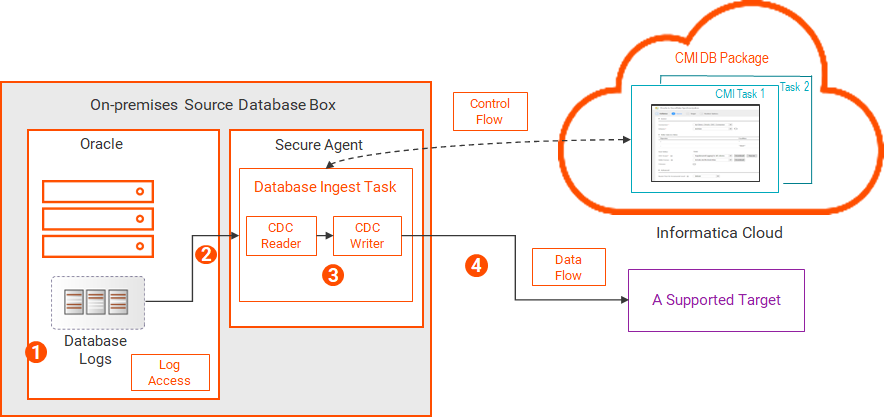
Direct log access
Database ingestion and replication jobs can directly access the physical Oracle redo logs on the on-premises source system to read change data.
Note:
If you store the logs on solid-state disk (SSD), this method can provide the best performance.
The following image shows the data flow:
1The Oracle database writes change records to the database log files on disk.
2The Database Ingestion and Replication CDC Reader reads the physical log files and extracts change records from the log files for the source tables of CDC interest.
3The Database Ingestion and Replication CDC Writer reads the change records.
4The CDC Writer applies the change records to the target.
NFS-mounted logs
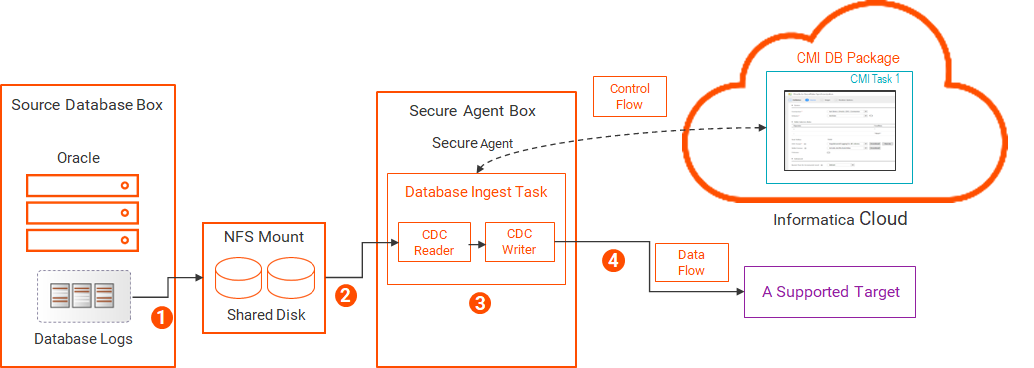
Database ingestion and replication jobs can access to Oracle database logs from shared disk by using a Network File Sharing (NFS) mount or another method such as Network Attached Storage (NAS) or clustered storage.
The following image shows the data flow:
1The Oracle database writes change records to database log files. The log files are written to shared disk.
The shared disk can be on any system that allows the files to appear as local to both the database and Secure Agent hosts. This sharing can be achieved by using NFS, as shown above, or by using Network Attached Storage (NAS) or clustered storage.
2The Database Ingestion and Replication CDC Reader reads the log files from the NFS server over the network and extracts the change records for the source tables of CDC interest.
3The Database Ingestion and Replication CDC Writer reads the change records.
4The CDC Writer applies the change records to the target.
ASM-managed logs
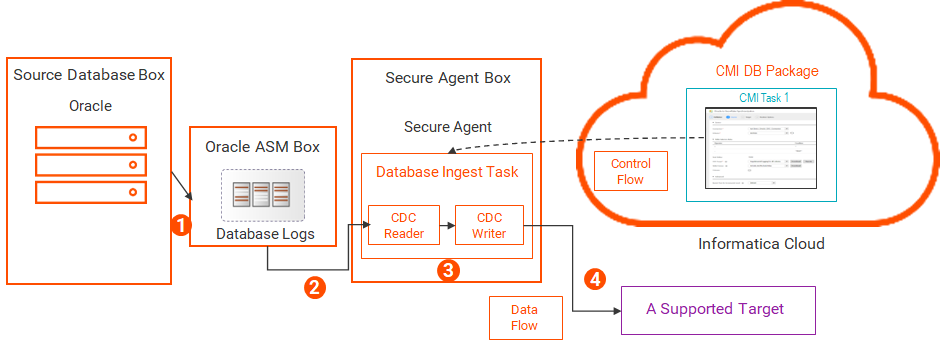
Database ingestion and replication jobs can access Oracle redo logs that are stored in an Oracle Automatic Storage Management (ASM) system. To read change data from the ASM-managed redo logs, the ASM user must have SYSASM or SYSDBA authority on the ASM instance.
When you configure an Oracle Database Ingestion connection, complete the properties that include "ASM" in their names.
Also, Informatica recommends that you set the sqlnet.recv_timeout parameter in the local sqlnet.ora file to less than 5 minutes when reading data from redo log files in Oracle ASM. This parameter specifies the duration of time that the Oracle client waits for a response from ASM before a query times out. Network interrupts and other factors can occasionally make Oracle connections unresponsive. Setting this value ensures that the reader can respond and recover from any such situation in a timely manner.
The following image shows the data flow:
1The Oracle database writes change records to the ASM-managed database log files.
2The Database Ingestion and Replication CDC Reader reads the ASM-managed log files and extracts the change records for the source tables of CDC interest.
3The Database Ingestion and Replication CDC Writer reads the change records.
4The CDC Writer applies the change records to the target.
ASM-managed logs with a staging directory
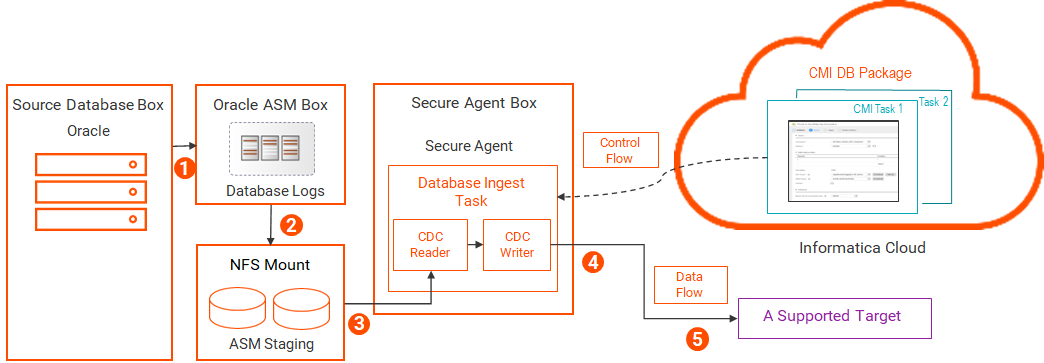
Database ingestion jobs can access ASM-managed redo logs from a staging directory in the ASM environment. In comparison to using ASM only, this method can provide faster access to the log files and reduce I/O on the ASM system. To read change data from the ASM-managed logs, the ASM user must have SYSASM or SYSDBA authority on the ASM instance.
The following image shows the data flow:
1The Oracle database writes change records to the ASM-managed log files.
2ASM copies the logs to a staging directory.
The staging directory must be on shared disk, such as an NFS mount, so that ASM can write data to it and database ingestion and replication jobs can read data from it.
3The Database Ingestion and Replication CDC Reader reads the log files in the staging directory and extracts the change records for the source tables of CDC interest.
4The Database Ingestion and Replication CDC Writer reads the change records.
5The CDC Writer applies the change records to the target.
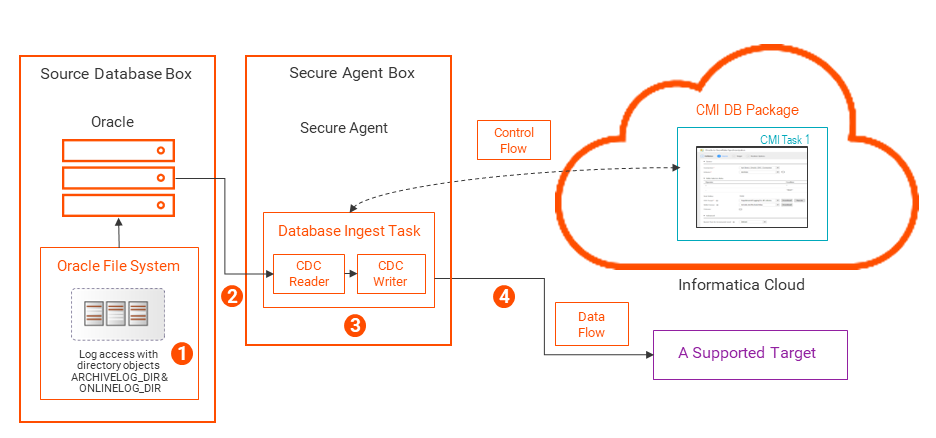
BFILE access to logs in the Oracle server file system by using directory objects
On an on-premises Oracle source system, you can configure Database Ingestion and Replication to read online and archived redo logs from the local Oracle server file system by using Oracle directory objects with BFILE locators. You must create Oracle directory objects named ARCHIVELOG_DIR and ONLINELOG_DIR that point to the locations of the Oracle redo log files.
The following image shows the data flow:
1The Oracle database writes change records to the redo log files in the local Oracle server file system. When a database ingestion and replication task needs to read log files, it connects to Oracle and issues a select request that references the ARCHIVELOG_DIR or ONLINELOG_DIR directory object to access the logs.
Note:
If you use BFILE access to Oracle data that is stored in multiple log locations, such as in an environment with a standby database, RDS database instance, or Fast Recovery Area, Database Ingestion and Replication can automatically find the logs by querying for all directory objects that begin with ARCHIVELOG_DIR and ONLINELOG_DIR and end with any suffix, for example, ARCHIVELOG_DIR_01, ARCHIVE_LOG_DIR_02, and so on. If database users who run database ingestion and replication jobs have the CREATE ANY DIRECTORY and DROP ANY DIRECTORY privileges, the directory objects can be created at runtime, as needed.
2The Database Ingestion and Replication CDC Reader reads the log file by using the OCI Client that is installed on the Secure Agent box and extracts the change records for the source tables of CDC interest.
3The CDC Reader sends the change records to the CDC Writer.
4The CDC Writer applies the change records to the target.
Database ingestion and replication combined initial and incremental load jobs can read change data from copies of archive redo logs. You must set the Reader Mode property to ARCHIVECOPY in the Oracle Database Ingestion connection properties and also set the source custom property pwx.cdcreader.oracle.reader.additional with the dir and file parameters. The dir parameter points to the name of the base directory that the CDC log reader scans for the archive log copies, and the file parameter specifies a mask that is used to filter the log copies.
Configuring BFILE access to Oracle redo logs in the Oracle file system
If you store redo logs in the local Oracle server file system and want to access the logs by using Oracle directory objects with BFILEs, perform the following configuration tasks:
Complete the following usual Oracle source prerequisite tasks that are not specific to BFILE access:
•Define the ORACLE_HOME environment variable on the Linux or Windows system where the Secure Agent runs for Database Ingestion and Replication to use the Oracle Call Interface (OCI) to communicate with the Oracle source database.
•Make sure the Database Ingestion and Replication user has the Oracle privileges that are required for the database ingestion and replication incremental load processing. For more information, see Oracle privileges.
•Enable ARCHIVELOG mode for the Oracle database.
•Define the archive log destination.
•Enable Oracle minimal global supplemental logging on the source database.
•If your Oracle source tables have primary keys, ensure that supplemental logging is enabled for all primary key columns. For source tables that do not have primary keys, ensure that supplemental logging is enabled for all columns from which change data will be captured.
Note:
When you create a database ingestion and replication task, you have the option of generating a script that implements supplemental logging for all columns or only primary key columns for the selected source tables.
•If the Oracle database parameter MAX_STRING_SIZE=EXTENDED is set in the database and a source table selected for capture processing has VARCHAR2, NVARCHAR2, or RAW columns greater than 4000 characters, those columns are excluded from capture processing unless you select the Include LOBs check box for the database ingestion and replication task.
Additionally, for BFILE access, perform the following steps to configure an online log destination and archive log destination:
1Query the Oracle database for the online and archived redo log locations in the Oracle server file system. You can use the following example queries:
To get location of the online redo logs:
select * from v$logfile;
To get the archive log destination:
select dest_id, dest_name, destination, status from V$ARCHIVE_DEST;
2Create the ONLINELOG_DIR and ARCHIVELOG_DIR directory objects that point to the locations of log files from step 1. An Oracle directory object specifies a logical alias name for a physical directory on the Oracle server file system under which the log files to be accessed are located. For example:
CREATE DIRECTORY ONLINELOG_DIR AS '/u01/oracle/data'; CREATE DIRECTORY ARCHIVELOG_DIR AS '/u01/oracle/archivedata';
If you plan to set the reader mode to ARCHIVEONLY in the Oracle Database Ingestion connection to read changes only from archive logs, you do not need to create an ONLINELOG_DIR directory or directory object.
The Oracle database does not verify that the directories exist. Make sure that you specify valid directories that exist in the Oracle file system.
Note:
If you use a softlink in these paths, database ingestion and replication incremental load and combined load jobs with an Oracle version 18cor later source will fail with the error ORA-22288: file or LOB operation FILEOPEN failed. To avoid this error, specify an absolute path prefix in the Directory Substitution connection property or remove the softlink in the log paths. Also, when manually creating BFILE directory objects, you can use absolute paths.
3To verify that the directory objects were created with the correct file system paths for the redo logs, issue a select statement such as:
4Grant read access on the ONLINELOG_DIR and ARCHIVELOG_DIR directory objects to the Database Ingestion and Replication user who is specified in the Oracle Database Ingestion connection properties. For example:
grant read on directory "ARCHIVELOG_DIR" to "cmid_user"; grant read on directory "ONLINELOG_DIR" to "cmid_user";
Note:
If the ONLINELOG_DIR path does not exist or match the path to the active redo logs, Database Ingestion and Replication tries to create the directory. If you do not have sufficient privileges to create the directory object, an error message is issued. In this case, ask your DBA to create the directory object with the correct path.
5In the Oracle Database Ingestion connection properties, select the BFILE Access check box.
Important:
If you use BFILE access to Oracle data stored in multiple log locations, Database Ingestion and Replication can automatically find the logs by querying for all directory objects that begin with ARCHIVELOG_DIR and ONLINELOG_DIR and end with any suffix, for example, ARCHIVELOG_DIR_01, ARCHIVE_LOG_DIR_02, and so on. This capability enables Database Ingestion and Replication to support Oracle standby databases that use log locations different from those on the primary database, replica logs on Amazon RDS database instances, and archive logs in the Fast Recovery Area to which the USE_DB_RECOVERY_FILE_DEST parameter points.
You can override the ARCHIVELOG_DIR and ONLINELOG_DIR names by using the custom properties pwx.cdcreader.oracle.database.additional BFILEARCHIVEDIR=<directory_object> and pwx.cdcreader.oracle.database.additional BFILEONLINEDIR=<directory_object> if necessary.
If you grant the CREATE ANY DIRECTORY and DROP ANY DIRECTORY privileges to database users who run database ingestion and replication jobs, the directory objects can be created at runtime, as needed. For example, if multiple archive and online log destinations exist in a database, the directory objects could be created with the following naming convention:
Database Ingestion and Replication performs no cleanup processing on these generated directory objects.
If you use the USE_DB_RECOVERY_FILE_DEST parameter and the CREATE ANY DIRECTORY and DROP ANY DIRECTORY privileges have not been granted, your DBA must create the directory objects daily or weekly, before your database ingestion and replication jobs run, by using a script such as:
create or replace directory ARCHIVELOG_DIR_2024_08_19 as '<DB_RECOVERY_FILE_DEST>/2024_08_19'
If you use the USE_DB_RECOVERY_FILE_DEST parameter and the database user has the CREATE ANY DIRECTORY and DROP ANY DIRECTORY privileges, the directory objects are created as needed at runtime and dropped after 14 days. These directory objects have the naming convention <ARCHIVEDIRNAME>_YYYY_MM_DD.
Using BFILE Access to a TDE Wallet
Database Ingestion and Replication can use BFILE access to a remote file-based Transparent Data Encryption (TDE) wallet.
If you configure a file-based TDE wallet, Database Ingestion and Replication first checks if the ewallet.p12 file exists in the TDE wallet directory on the local machine. If the file exists, processing continues as normal. If the file does not exist there, Database Ingestion and Replication looks for a directory object to use for remote access, as follows:
1Database Ingestion and Replication queries the database for a directory object with a path that matches the TDE wallet directory. This matching is case-insensitive when the database runs on Windows. Any trailing separators are ignored.
2If no matching directory object is found by the query and you have the CREATE ANY DIRECTORY system privilege, Database Ingestion and Replication creates the directory object with the directory_name PWXTDEDIR.
3If you do not have the CREATE ANY DIRECTORY system privilege, you should ask your DBA to create the directory object. The directory object can have any name the DBA chooses. You must have READ access to the directory object.
After the directory object exists, the TDE wallet can be read remotely from the database during initialization. You do not need to copy the wallet to the local machine.
Oracle Data Guard databases or far sync instances as sources
Database Ingestion and Replication can capture change data from Oracle Data Guard primary databases, logical or physical standby databases, and far sync instances.
A far sync instance is a remote Oracle Data Guard destination that accepts redo from the primary database and then ships that redo to other members of the Oracle Data Guard configuration.
You can initially load a target with data either from the Oracle Data Guard primary database or from a standby database that is open in read mode.
Configuration
Oracle change capture configuration depends on the Oracle Data Guard database type.
•For the primary Oracle database , grant SELECT permissions on the V$STANDBY_LOG view to the Database Ingestion and Replication user:
GRANT SELECT ON "PUBLIC".V$STANDBY_LOG TO <cmid_user>;
If the primary database is in an Amazon RDS for Oracle environment:
•For a physical standby database in mount mode (not open with read only access), set the following Oracle Database Ingestion connection properties:
- Database Connect String - Ensure that it points to the primary database to read the Oracle catalog.
- Standby Connect String - An Oracle connection string, defined in TNS, that the log reader uses to connect to the Oracle physical standby database and monitor the logs.
- Standby User Name - A user ID that the log reader uses to connect to the Oracle physical standby database. This user ID must have SYSDBA authority.
- Standby Password - A password that the log reader uses to connect to the Oracle physical standby database.
Note:
With a database in mount mode, you can use a password file for user authentication. Initially, you must grant SYSDBA authority to the user. If you want to avoid granting permanent SYSDBA authority to the user, you can copy the primary password file to the physical standby or far sync instance and then revoke SYSDBA authority for the user. Repeat this process whenever you refresh the password file.
Optionally, configure the following additional connection properties:
- RAC Members - The maximum number of active threads on the Data Guard primary database when the database is in a RAC environment,
- Reader Standby Log Mask - A mask that the log reader uses for selecting redo logs for an Oracle standby database when the database uses multiplexing of redo logs.
For more information, see "Oracle Database Ingestion connection properties" in Connectors and Connections.
•For a logical standby database , no special configuration tasks are required. Configure it the same way as for an Oracle database that is not in a Data Guard environment.
Standby-to-primary role transitions
In an Oracle Data Guard environment, a physical standby database can transition to the primary role. Usually, the role transition occurs because of a failover or switchover. During the transition, all active connections to the physical standby database terminate.
To be able to resume CDC processing after the physical standby database transitions to the primary role, you might need to adjust some connection configuration properties on the original standby system for Database Ingestion and Replication to process past the transition point. After the transition, you can adjust the properties again for optimal performance in the new primary database environment.
The following table describes these connection properties by transition phase:
Connection Property
Before Transition
During Transition
After Transition
RAC Members
Specify the number of active threads on the primary database.
Specify the total number of active threads with unique thread IDs on both the standby database and primary database.
For example, if the primary database is a two-node RAC database that uses thread IDs 1 and 2 and the standby database is a 3-node RAC database that uses thread IDs 2, 3, and 4, specify a property value of 4.
After the restart point has progressed beyond the transition point, edit the property value, as needed, for optimal performance of change data capture from the new primary database.
Informatica recommends that you use the lowest value that is suitable for your environment to minimize the overhead of CDC thread tracking.
Reader Standby Log Mask
Standby Connect String
Standby User Name
Standby Password
Remove all standby properties. They're not applicable to physical standby databases open for read only access.
Properties remain removed.
Do not specify these properties. They're not used for a primary database.
Database Connect String
If the standby database is not open, define the connection string for the primary database.
If the standby database is open, define the connection string for the standby database.
Specify the connection string for the database that will have the primary role after the role transition.
Ensure that this connection property defines the connection string for the new primary database.
Oracle archive log retention considerations
Database ingestion and replication incremental load and combined initial and incremental load jobs must be able to access transaction data in Oracle online and archive redo logs. If the logs are not available, database ingestion and replication jobs end with an error.
Typically, the Oracle DBA sets the archive log retention period based on your oganization's particular business needs and Oracle environment. Make sure that the source archive logs are retained for the longest period for which you expect change capture to be stopped or latent, plus about 1 hour, so that the logs will be available for restart processing.
To determine if the current log retention policy in your environment is sufficient to accommodate database ingestion and replication change capture processing, consider the following factors:
•How long are Oracle transactions typically open on a source?
•What is the longest period of time that change capture is allowed to be down or latent, accounting for weekends and holidays?
•What is the replication latency from source to target?
•Do you run database ingestion and replication jobs based on a schedule? If yes, what type of schedule?
•Is the pwx.cdcreader.oracle.option.additional ageOutPeriod=minutes custom property set on the Source page of task wizard?
Note:
This property specifies the age at which outstanding UOWs without change records of CDC interest are removed from the calculation of the next restart point. You can use the property to prevent CDC failures that might occur if you shut down and then restart capture processing while the transaction is outstanding and the redo log in which the UOW started is not available.
•What is the redo generation rate?
•Do you ship copies of archive logs to a secondary system?
If the archive logs are not available when you need to restart capture processing in the logs, you can ask your DBA to restore them and to modify the retention period if necessary. Otherwise, perform another initial load to re-materialize the target and then start incremental change data processing again. However, in this case, you might lose some changes.
Providing JDBC connection details in the tnsnames.ora file
You can optionally enter JDBC connection details for an Oracle source in the Oracle tnsnames.ora file for database ingestion and replication unload processing and Log-based CDC. If you need to make changes to the connection later, you can then update the details in the tnsnames.ora file only instead of in both the Oracle Database Ingestion connection properties and the tnsnames.ora file.
You can use the tnsnames.ora file with either the Native Oracle JDBC driver or Progress DataDirect Oracle JDBC driver. You'll need to create and configure the tnsnames.ora file. You'll also still need to define an Oracle Database Ingestion connection that specifies a database connect string, which specifies the TNS entry for the source database.
This feature does not apply to Oracle sources that use Query-based CDC or to Oracle targets. Also, when using the tnsnames.ora file only for connection details, you can’t configure SSL encryption and Kerberos authentication.
To set up use of the tnsnames.ora file, complete the following steps:
1Configure a tnsnames.ora file. Add a TNS entry for your source database. For example:.
# Entry for the database 'MY_DB' on the server specified by the host name MY_DB_TNS_NAME = (DESCRIPTION = (ADDRESS = (PROTOCOL = TCP)(HOST = my_server_hostname)(PORT = 1521)) (CONNECT_DATA = (SERVER = DEDICATED) (SERVICE_NAME = my_service_name.example.com) ) )
2To define the location of the tnsnames.ora file, set one of the following system environment variables, listed in order of priority:
- TNS_ADMIN environment variable
- ORACLE_HOME environment variable
If a task can’t find the tnsnames.ora in one of these locations, it fails with an appropriate error message.
3When you configure a database ingestion and replication task in the task configuration wizard, set the source custom property useTnsNamesInJDBCUrl to true on the Task Details – Source Details page to enable use of the tnsnames.ora file for unload processing.
4Define an Oracle Database Ingestion connection with the following properties:
- Set the Database Connect String property to a valid TNS name of an entry in the tnsnames.ora file.
- Specify the required Host, Port, and Service Name values. These properties are required in the connection but are used only when testing the connection from the user interface. They’re superseded by the TNS entry in the tnsnames.ora file when getting metadata during task configuration and at task runtime.