CLAIRE Copilot includes the following new features:
•You can set a context scope for your conversation with CLAIRE Copilot, so that it only searches and suggests data from relevant projects and connections.
•When you create a mapping in SQL ELT mode that runs in the Snowflake ecosystem, you can prompt CLAIRE Copilot to add configured transformations to the data flow.
•CLAIRE Copilot can perform data exploration, profiling, and quality assessment for some connection types.
•CLAIRE Copilot can diagnose problems, such as failed mapping tasks, and suggest troubleshooting steps.
Connection parameters for mappings and mapplets
When you import a mapplet into a mapping, you can either reuse an existing mapping-level connection parameter or create a new one for the mapplet's connection parameters. You can manually select the connection parameter or accept Data Integration's suggestion based on connection type.
Duplicate expression fields
You can duplicate expression fields in Expression and Aggregator transformations. When you duplicate a field, Data Integration copies the configured expression and field metadata to the new field.
Find transformations
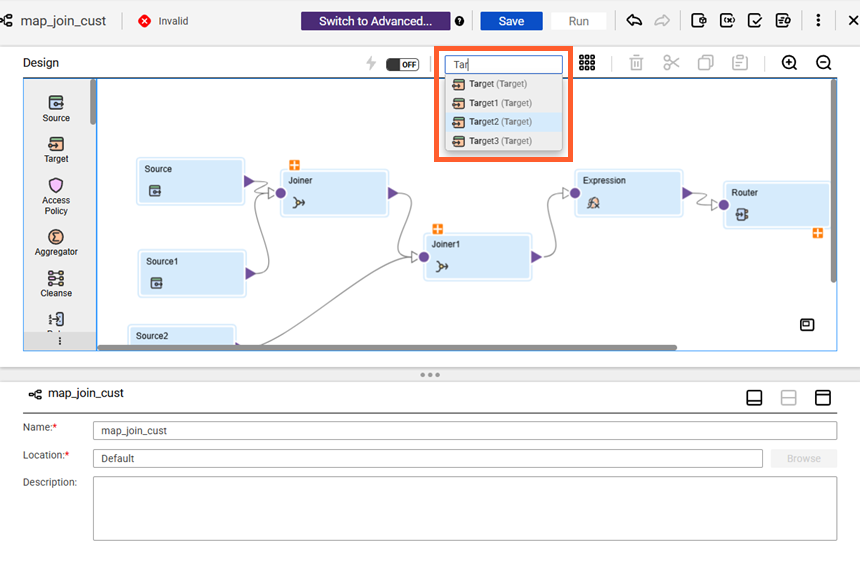
You can search for transformations by name or type on the Mapping Designer and Mapplet Designer. To find a transformation, enter a full or partial string in the Find transformation box.
The following image shows the Find transformation box on the Mapping Designer:
Fixed-width file formats
This release includes the following new features for fixed-width file formats:
•The Fixed-Width File Format page is updated with a new look and feel for increased usability.
•You can create a new flat file or FTP/SFTP connection directly from the Fixed-Width File Format page.
•You can add, delete, reorder, and search for fields in the Fields section.
•You can preview your sample data before and after you configure field widths and metadata.
Hierarchy Builder transformation
You can download the source file from which a hierarchical schema asset is created, so that you can review, reuse, or share the file. This applies to assets that are associated with the Hierarchy Builder transformation and that were created from an XML file or an XML Schema Definition (XSD) file.
Hierarchy Parser transformation
You can download the source file from which a hierarchical schema asset is created, so that you can review, reuse, or share the file. This applies to assets that are associated with the Hierarchy Parser transformation and that were created from an XML file or an XML Schema Definition (XSD) file.
Intelligent structure models
This release includes the following enhancements for intelligent structure models:
•When you create an intelligent structure model from an Excel file using Claire engine, you can read hidden sheets in the workbook at design time and run time.
•When you create an intelligent structure model using Claire engine, you can discover the structure of additional file formats, including email, Markdown, YAML, HTML, and PowerPoint, and to extract data from charts and graphs in your documents.
New fields
When you add a new field to the following transformations, the properties panel automatically scrolls to the new field:
•Aggregator
•Expression
•Lookup
•Normalizer
•Source
•SQL
•Target
Partitioned sources
When you use a partitioned source with a flat file target, you can write output data to a specified output file and directory. To write target data to the output file and directory that you specify, enable the Use output file path for partitioned sources advanced property in the Target transformation.
Preview error row files
You can preview error row files directly in Data Integration, even when you customize the error log directory. This enhancement enables you to view error logs regardless of directory configuration.
Session logs
Mapping session logs now include both the connection ID and connection name, making it easier for you to identify connections while diagnosing failures. For the following connections and scenarios, the session log lists only the connection ID:
•Flat file
•FTP/SFTP
•Parameterized connection names that are passed through in-out or input parameters
Structure Parser transformation
You can configure the Structure Parser transformation to produce a single, complete JSON or XML output row instead of splitting the structured document across multiple rows.
Target transformation
When you configure a Target transformation with an FTP connection, you can specify the Remote File Name advanced property. You can also parameterize the file name and override it at run time with a value that you specify in a parameter file.
Tasks
This release includes the following enhancements for tasks:
•When you configure a custom query source in a mapping taskor dynamic mapping task, you can view and edit the field metadata.
•When you view details for a mapping task, the Task Details section displays the execution mode.