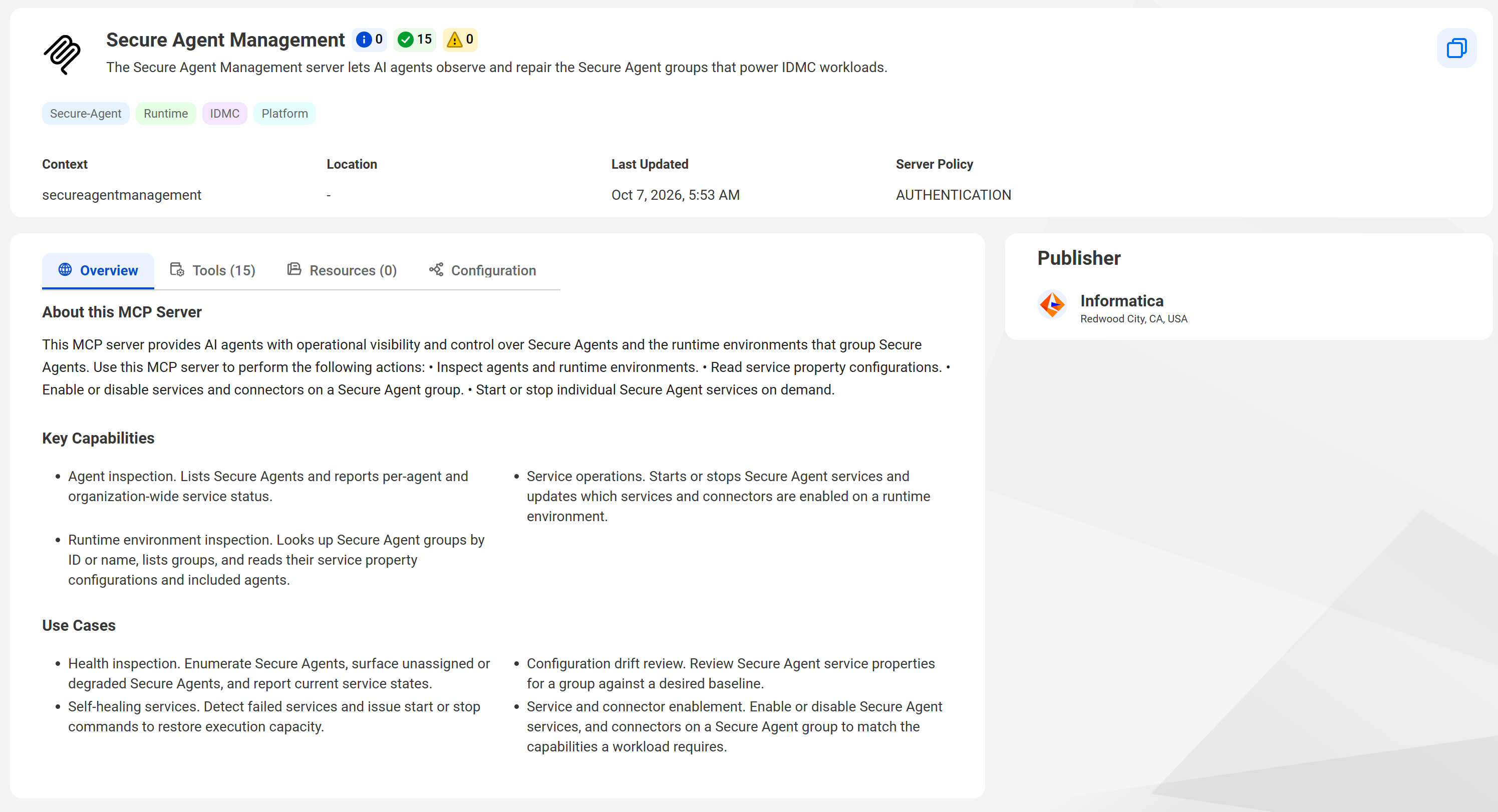
To view details about a shared MCP server, click the tile for the MCP server on the MCP Servers page. The MCP server details page contains a detailed description of the MCP server including its key capabilities and use cases, the tools and resources it contains, and configuration information.
The following image show the MCP server details for a shared MCP server:
The following areas of the MCP server details page display information about the MCP server:
Top panel
The top panel of the server details page displays the following information:
•MCP server name and brief description.
•Number of tools with the preview, active, and deprecated statuses.
•MCP server context. The context is the last part of the URL string and helps to uniquely identify the MCP server.
•Location. For shared MCP servers, the location is always "-".
•Date the MCP server was last updated.
•Server security policy. The server security policy for shared MCP servers is always AUTHENTICATION.
Click the copy button to copy the MCP server's endpoint URL.
Publisher
The publisher displays the user that published the MCP server. For shared MCP servers, the publisher is always Informatica.
Overview tab
The Overview tab displays a detailed description of the MCP server, it's key capabilities, and use cases.
Tools tab
View information about the MCP server's tools on the Tools tab. Select a tool to view information about the tool.
The following table describes the information you can view for each tool:
Property
Description
Lifecycle state
Lifecycle state of the tool.
Each tool has one of the following lifecycle states:
- Preview. The tool is preview functionality.
Preview functionality is supported for evaluation purposes but is unwarranted and is not supported in production environments or any environment that you plan to push to production. Informatica intends to include the preview functionality in an upcoming release for production use, but might choose not to in accordance with changing market or technical circumstances. For more information, contact Informatica Global Customer Support.
- Active. The tool is supported and available for use.
- Deprecated. The tool can still be used, but Informatica plans to remove it in a future release. To avoid errors in a future release, use a different tool. The warning message lists the tool's successor, if there is one.
Description
Description of the tool.
Hover over the description to see the full description.
Annotations
Read-only hints that describe the behavior of the MCP server tools.
A tool in a shared MCP server can have any of the following annotations:
- Read Only. Indicates that the tool strictly queries or reads information without altering its environment. For example, the tool retrieves information from local files but doesn't modify them.
- Destructive. Indicates that the tool can perform destructive, risky, or irreversible updates. For example, the tool deletes files, drops database tables, or sends emails.
- Idempotent. Indicates that calling the tool repeatedly with identical arguments produces the same outcome without cumulative side effects. For example, the tool performs a database upsert or sets a configuration key.
Scopes
Displays the high-level permissions that an OAuth client with the Authorization Code grant type needs to call the tool.
The client must have all of the enabled scopes in order to call the tool. For example, a client that has only the Read (mcp:tools:read) scope can't call any tool that has the Write or Execute scope, even if the tool also has the Read scope. If the client tries to call a tool without the matching scopes, the resource server rejects the request.
The names and descriptions of each field associated with the selected tool. Field descriptions are displayed in both data type and JSON format.
Resources tab
View information about the MCP server's resources on the Resources tab. Resources are read-only data sources that provide read-only, contextual information to the AI like skill files, reference files, or API specifications. They allow the AI to access contextual information safely, without executing external code or changing data.
Select a resource to view information about the resource like the resource description, resource type, URI, size, and last modified date.
The following table describes the resource types:
Resource type
Description
API
Live data returned by calling the product API.
An API resource can be either of the following types:
- Concrete. The resource has have a fixed URI without parameters that points to the same entity every time it's read. For example, an API resource named jobs://running returns a list of running jobs.
- Template. The resource has a dynamic URI that contains one or more parameters enclosed in curly braces. Template resources allow the AI to pass arguments in the URI to retrieve specific data. For example, an API resource named catalog://assets/{assetId}/details returns details for an asset with the supplied asset ID.
File
One CSV, markdown, PDF, or text file. For example: infa-skill:///data-integration-job-operator/SKILL.md.
File resources are concrete resources. They have a fixed URI.
Zip
One or more related files returned as a ZIP package. For example: file:///job-management-operator-toolkit.zip
Zip resources are concrete resources. They have a fixed URI.
Note:
If you use an OAuth client with the Authorization Code grant type to access the MCP server, the client must have the Read (mcp:resources:read) scope to read resources. For more information about client scopes, see OAuth client scopes.
Configuration tab
Explains how to connect to the MCP server using Claude Desktop, Cursor, VS Code, and Python. Provides code blocks that you can copy for each authentication type.