Use the agent flow canvas to build, test, and deploy AI agents.
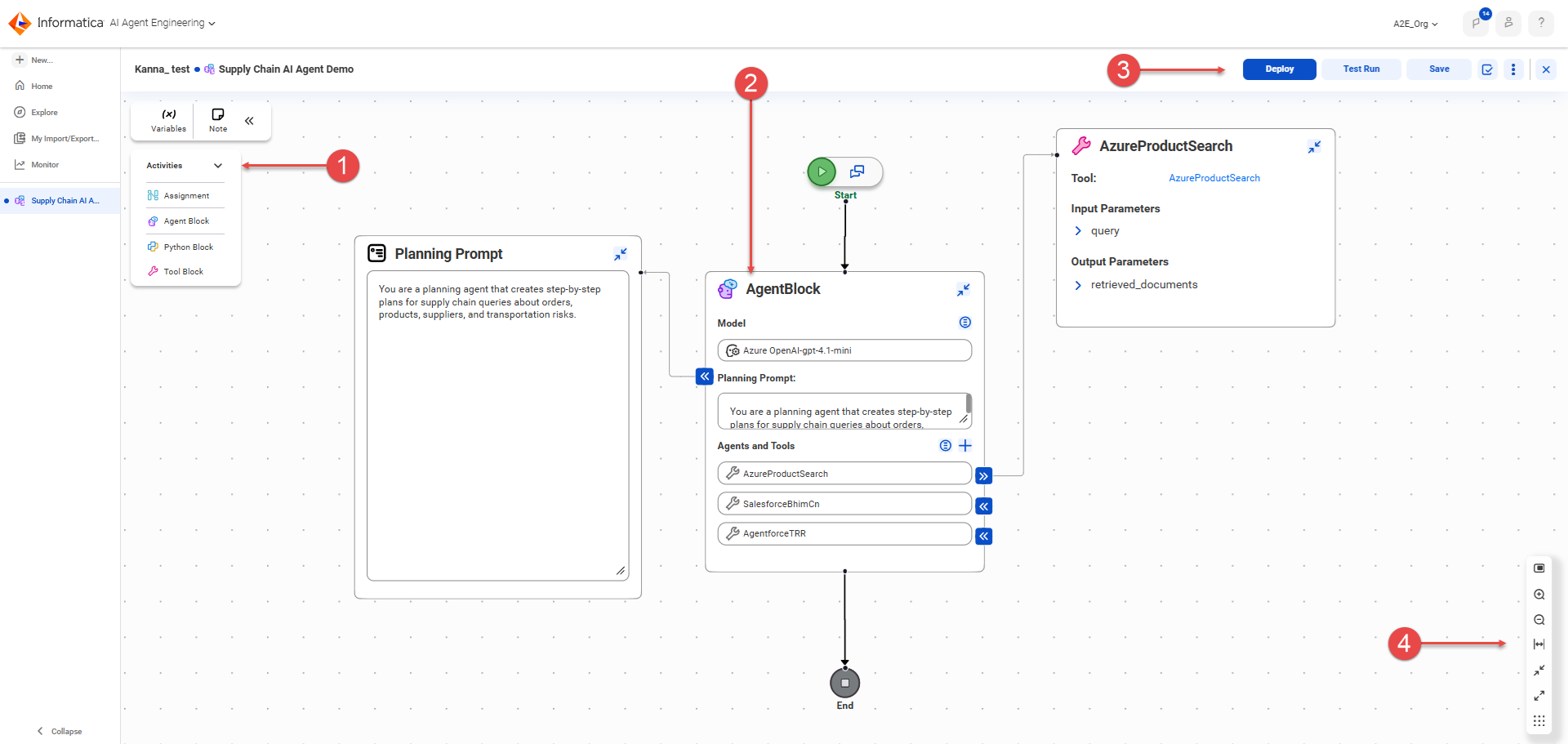
The following image shows the agent flow canvas:
1Activities menu. Drag variable assignment blocks, agent blocks, Python blocks, and tool blocks onto the canvas.
2Agent block. Configure an AI agent.
3Controls for deploying, testing, saving, validating, and closing the agent flow. Use the kebab menu to view and configure deployment properties or to undeploy an agent flow.
4Canvas controls. Pan the view, zoom in and out, fit contents to the canvas, minimize and maximize all blocks, and automatically adjust the layout.
You can perform the following tasks on the canvas:
•Start building an AI agent.
Drag an agent block into the flow between the start and end nodes.
•Configure the agent.
Select the LLM. Enter a planning prompt to guide the agent and explain its purpose. Select the tools and other AI agents that the agent can use to accomplish its goal.
•Optionally, add other agent blocks, Python blocks, tool blocks, and variable assignment blocks to the flow.
For more information about building an agent and configuring the flow, see Build an AI agent .
•Save the agent flow at any time during development.
•Validate the agent flow to check for design-time errors.
•Deploy the agent flow to an AI agent.
For more information about deploying an agent, see Deploy the agent.
•Test the agent flow.
For more information about testing an agent, see Test the agent.