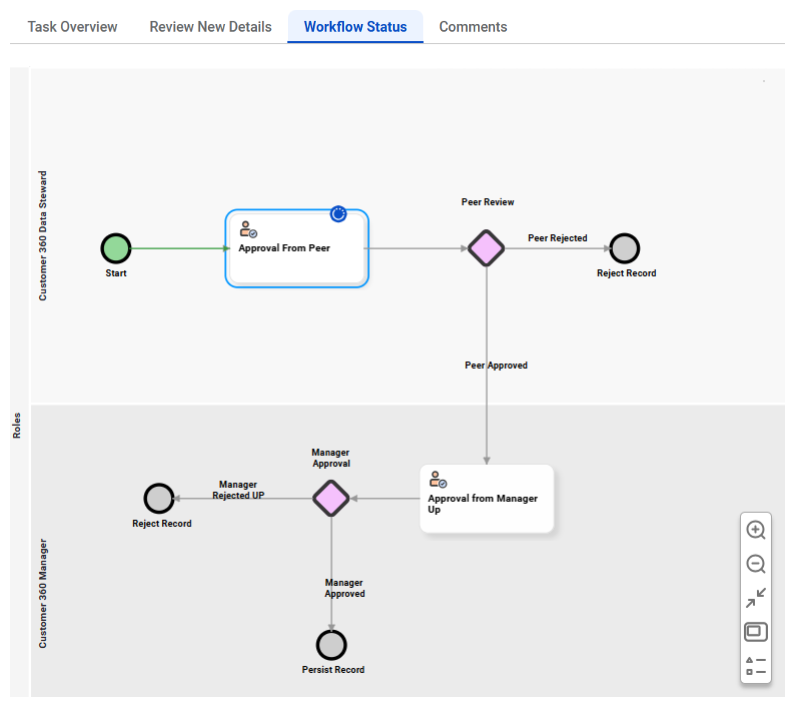
You can view the workflow as a flow chart to understand where your task fits. You can also check the status of other tasks running in parallel and see if other stakeholders have already reviewed or are yet to review them.
For example, when a record for a new product is created, it can be sent to multiple stakeholders such as business, product, and marketing managers for review. A business manager can refer to the workflow to see whether the product and marketing managers have reviewed the record, helping them understand the scope of their own review.
The following image shows the workflow status for a task to review a new record:
Workflow status shows you the entire sequence of a workflow, including all its components, such as user tasks for human decisions, service tasks for automated tasks performed by MDM SaaS, and possible decisions and outcomes for each task. You can also view the user role associated with each task.
You can also view the following details:
•Paths leading to and from completed tasks and in-progress tasks are shown in green color.
•Your task is highlighted in blue volor.
•All the tasks that are in progress are identified by a blue icon.