You can use Read Rule Association Status service tasks to orchestrate task outcomes based on the validation statuses of rule associations defined in Enrichment and Validation Orchestrator.
For more information about Enrichment and Validation Orchestrator, see Orchestrating data enrichment and validations.
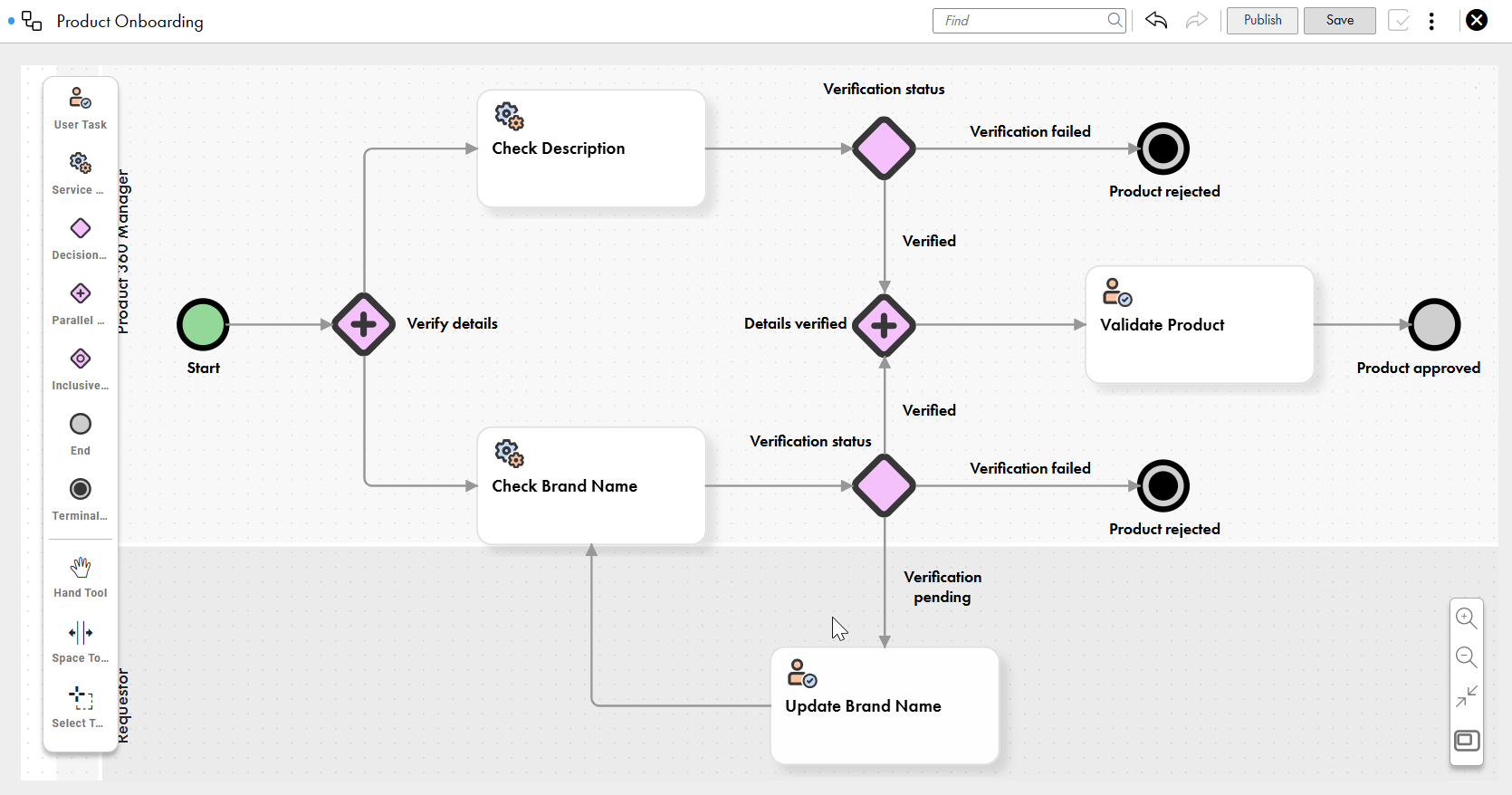
Consider the following workflow for a product onboarding process:
The workflow includes multiple tasks to evaluate product details. The Check Description and Check Brand Name service tasks check the statuses of the rule associations for the product description and brand name fields. The service tasks return the statuses of the rule associations configured as input for the service tasks. Task outcomes, such as onboarding the product, updating its details, or rejecting it, are then determined according to the rule association statuses.
To configure a Read Rule Association Status service task, drag a service task component to the required swimlane and perform the following steps:
Configure properties for Read Rule Association Status service tasks
To identify the service task in the workflow, configure the basic properties of the Read Rule Association Status service task, such as task name and internal ID.
1Select a service task on the workflow canvas.
2From the list of service task types, select Read Rule Association Status.
3Enter a name for the service task.
4Optionally, enter a custom internal ID and add a description.
Input details for Read Rule Association Status service tasks
After you configure the properties of a service task, configure input details to identify the rule associations and their validation statuses for the service task.
Input details for Read Rule Association Status service tasks consist of evaluation criteria. Evaluation criteria identify rule associations based on objective groups and severity types of rule associations. To check the statuses of rule associations from different objective groups, add multiple evaluation criteria to a Read Rule Association Status service task. You can configure a task outcome for each evaluation criteria.
Each evaluation criteria consists of the following details:
•Criteria Name. Name of the evaluation criteria.
•Objective Groups. Objective groups for identification of rule associations and their validation statuses that you use to configure task outcomes.
•Objectives. Objectives from the selected objective groups for identification of rule associations and their validation statuses. If you don't specify any objectives, the service task uses all the objectives in the selected objective groups.
•Severity Type. Severity levels of rule associations for identification. Rule associations can have a severity type of error, warning, or information. You can identify rule associations of all three severities, only error and warning severities, or only error severity.
•Set Rule Associations Without Status. Status to use when identified rule associations don't have any status because they didn't run. You can set the status to Success, Failed, or Unknown.
•Set the Exception Status as Failed. Indicates whether the status of the evaluation criteria can be set to Failed when an identified rule association has the Exception status. When you enable it, the evaluation criteria status is set to Failed. Otherwise, the status remains as Exception.
For example, a workflow to evaluate product details can have Read Rule Association service tasks to check details of the product, such as brand name and description..
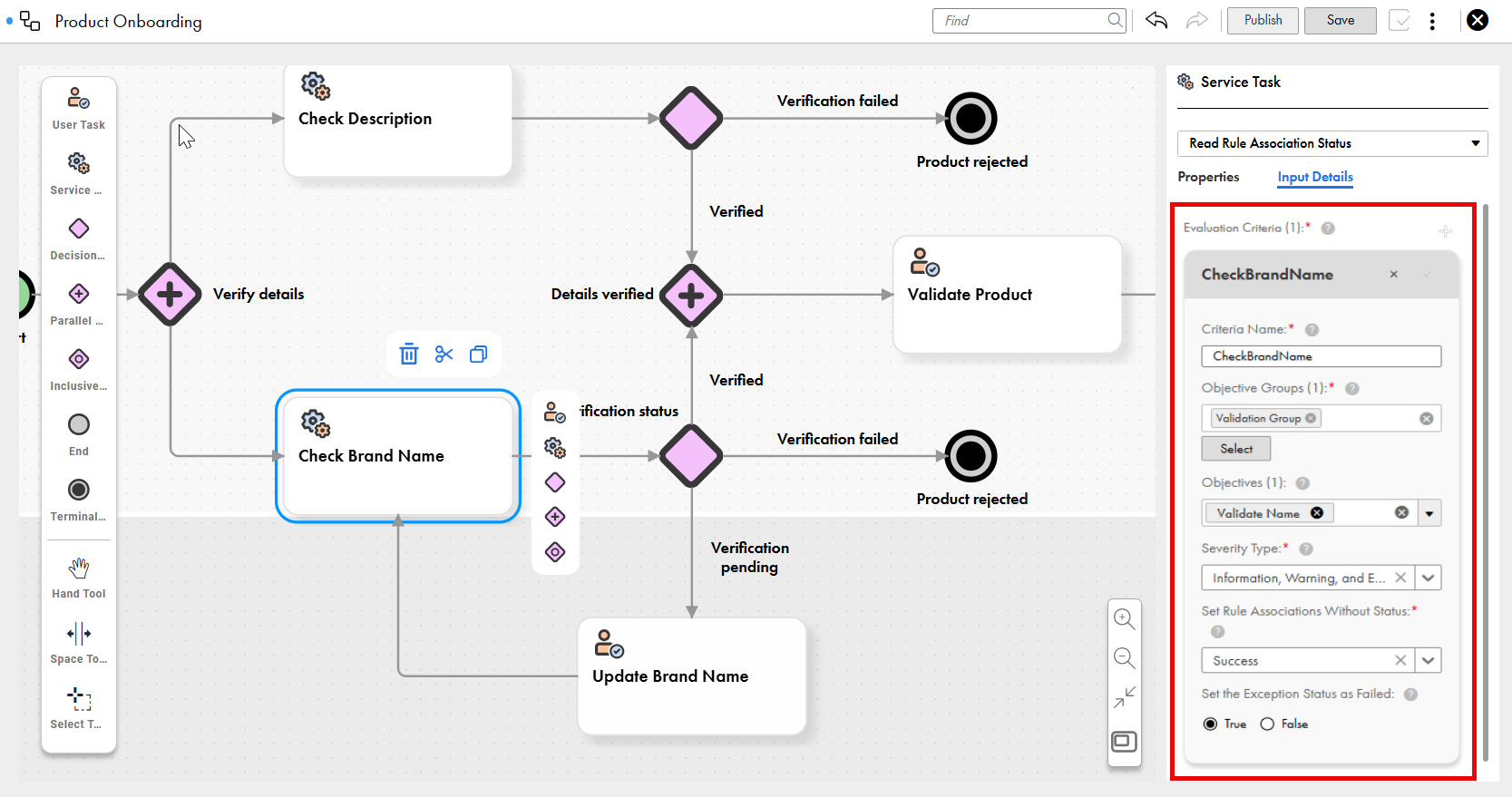
The following image shows the evaluation criteria configuration for a sample product onboarding workflow:
In this example, the evaluation criteria checks the statuses of rule associations with information, warning, and error severity types from the Validate Name objective in the Validation Group objective group. If a rule association didn't run and has no status, its status defaults to Success. If a rule association has an Exception status, it remains in the Exception status.
Based on the statuses of rule associations that an evaluation criteria identifies, the service task assigns a status to the evaluation criteria. You can then configure a task outcome based on that status.
Each evaluation criteria returns a status based on how you configure the criteria and the statuses of rule associations that the criteria identifies. You can configure a task outcome for each evaluation criteria status.
An evaluation criteria can have one of the following statuses in the following order of priority:
•Exception: If one of the rule associations returns the Exception status, then the evaluation criteria has the Exception status.
•Failed: If one of the rule associations has the Failed status, then the evaluation criteria returns the Failed status.
•Unknown: If one of the rule associations has no status because it didn't run for the record or it's disabled, then the evaluation criteria returns the Unknown status.
•Success: If all the rule associations ran successfully, then the evaluation criteria returns the Success status.
The order of priority ensures that the criteria has the Exception status even if one rule association has the Exception status. If all rule associations run successfully, then the criteria returns the Success status.
Evaluation criteria has different statuses based on the combination of statuses they return:
•If an evaluation criteria has all the possible statuses, then it returns the Exception status.
•If an evaluation criteria has the failed, unknown, and success statuses, then it returns the Failed status.
•If an evaluation criteria has the unknown and success statuses, then it returns the Unknown status.
Note:
You can configure an evaluation criteria to override the Unknown and Exception statuses of rule associations. If you select the success or failed option for the Set Rule Associations Without Status field while configuring the evaluation criteria, then the evaluation criteria can't return the Unknown status. Similarly, if you turn on the Set the Exception Status as Failed toggle, then the evaluation criteria can't return the Exception status.
Configure input details for Read Rule Association Status service tasks
Configure evaluation criteria to identify rule associations and their validation statuses. You can configure a task outcome for each evaluation criteria.
1Select a service task on the workflow canvas.
2On the Input Details tab, enter a name for the criteria.
3Select objective groups whose rule associations you want to use.
4Select the objectives that you want to use from the selected objective groups.
If you don't select any objectives, the service task uses all the objectives in the selected objective groups to identify rule associations.
5Select a severity type based on which you want to identify rule associations.
6Select the status to assign to rule associations without statuses.
7Optionally, to set the evaluation criteria to the Failed status when an identified rule association returns the Exception status, enable Set the Exception Status as Failed.
8Configure additional evaluation criteria that can use different objective groups.
Conditions for connections for Read Rule Association Status service tasks
To design different paths in workflows, use decision gateways or inclusive gateways after service tasks. To determine the outcomes of outgoing connections from the gateways to other components in the workflow, configure conditions.
A condition is a simple expression that uses the internal ID of a service task, criteria names, and criteria results. Conditions use the results of evaluation criteria to determine task outcomes.
For more information about expressions, see Expressions.
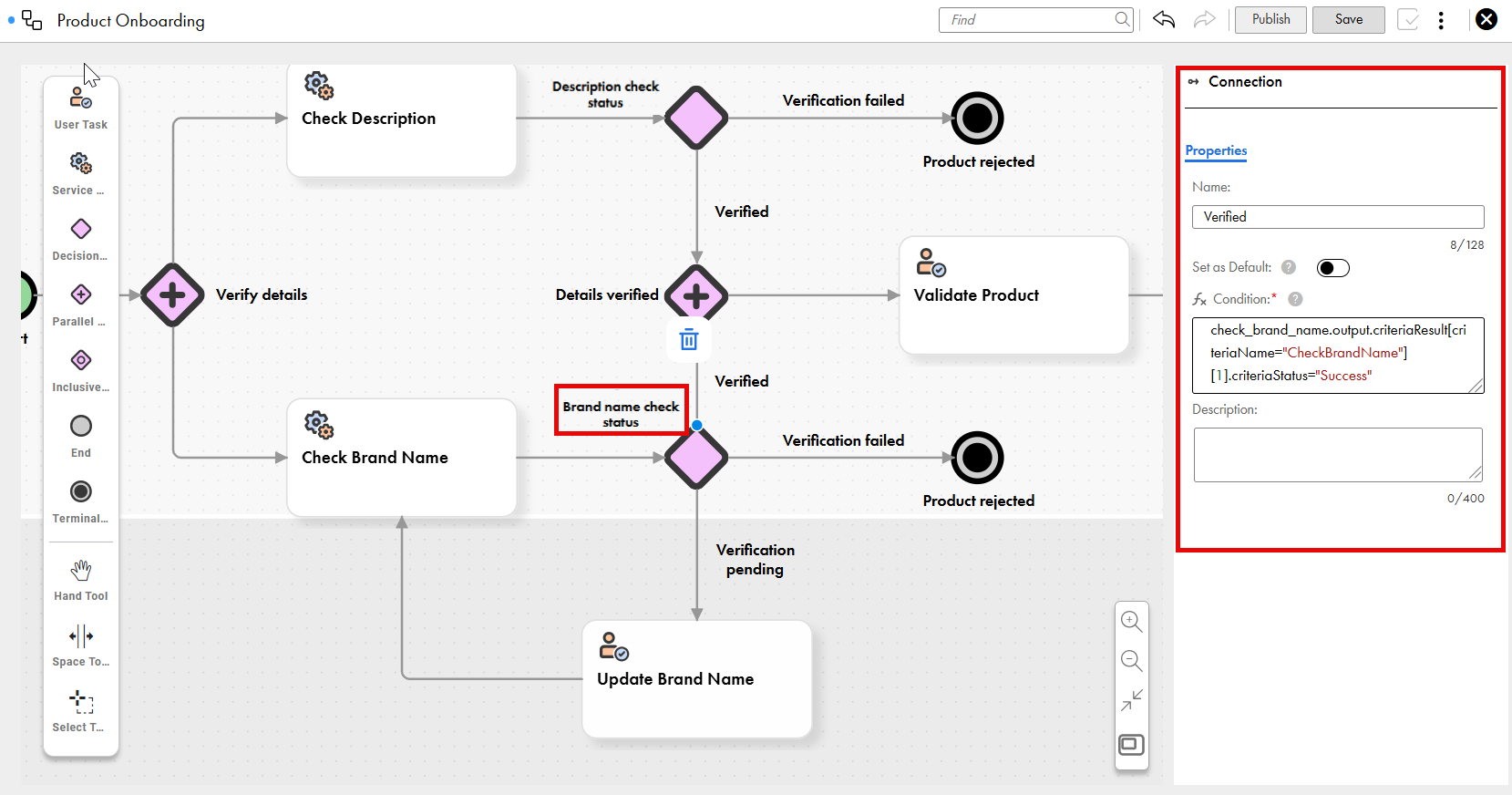
Consider the example of the workflow for the product onboarding process:
The Brand name check status decision gateway determines the task outcome based on the output value of the Check Brand Name service task.
The following sample condition is added to the connection to configure the workflow to proceed to the next step in the product onboarding process if the evaluation criteria returns the Success status:
Similarly, the following sample conditions can be added to other connections from the Brand name check status decision gateway based on the evaulation criteria statuses:
•check_brand_name.output.criteriaResult[criteriaName="CheckBrandName"][1].criteriaStatus="Exception" for the Exception status.
•check_brand_name.output.criteriaResult[criteriaName="CheckBrandName"][1].criteriaStatus="Failed" for the Failed status.
•check_brand_name.output.criteriaResult[criteriaName="CheckBrandName"][1].criteriaStatus="Unknown" for the Unknown status.
Note:
If you want to set a connection as the default connection when conditions in other outgoing connections aren't met, then you don't have to configure a condition for the connection.
Configure conditions for Read Rule Association Status service tasks
To design different paths in workflows, configure conditions for the decision gateways or inclusive gateways after service tasks.
1On the workflow canvas, select an outgoing connection from a service task, and enter a name for it.
2Enter a condition that uses the internal ID of a service task, a criteria name, and a criteria result.
3Optionally, to set a connection as the default connection when conditions in other outgoing connections aren't met, turn on the Set as Default toggle.